Assessments of a health-related matter of interest, importance, or worry to a patient, patient’s authorized representative, or patient’s healthcare provider that could identify a need, problem, or condition.
Description (*Please confirm or update this field for the new USCDI version*)
Assessment of a person’s dietary intake.
Submitted By: Michelle Ashafa
/ Academy of Nutrition and Dietetics
Data Element Information
Data Element Description
A systematic nutrition assessment of an individual's nutrition intake, physical exam, anthropometric measurements, biochemical, and health condition data compared to accepted standards, recommendations, and/or goals to arrive at a determination of the client’s nutrition well-being or malnutrition.
Use Case Description(s)
Use Case Description
Among the initial assessments in healthcare settings, a comprehensive nutritional evaluation is performed to establish a baseline Nutrition Status. This involves nutrition intake patterns and food availability, clinical evaluations like anthropometric measurements (BMI, waist circumference, etc.), and laboratory tests like mineral status, vitamin levels, or other nutrient markers and encompasses various medical professionals in its completion. Upon admitting a patient with a chronic condition, such as diabetes, kidney disease, heart disease, or before surgery, understanding the patient's Nutrition Status is essential to the plan of care. It aids in personalizing meal plans during a hospital stay to optimize a return to health. It helps in predicting recovery rates and potential complications. It assists in tailoring food and nutrition transitions of care. When a primary care provider refers a patient to a specialist, such as an endocrinologist for diabetes management or a registered dietitian for specific nutritional therapy, the Nutrition Status should be available to provide care providers with a comprehensive understanding of the patient's nutritional baseline.
Frequency of use would be every time a patient is admitted or re-admitted to the hospital or care setting, when a referral is generated, or when a change in health status occurs.
Estimate the breadth of applicability of the use case(s) for this data element
Level 2 - Use cases apply to most care settings or specialties.
To manage conditions, such as cancer, the NCP contributes to the development, modification, and communication of the Nutrition Status to the care team.
Nutrition Assessment provides a baseline on the nutritional contributors to the patient's nutrition status and problem(s) and enables targeted and effective interventions. Effective interventions consider the comprehensive nutrition status of the patient, social determinants that may impact care, and the medical treatment plan (eg, surgery, chemotherapy) improving the ability to adhere to medical therapies and better treatment outcomes. Nutrition Monitoring and Evaluation, the continuous review of the nutritional status, ensures that the interventions are and remain effective and can be modified as the patient's needs change. The nutrition status helps inform the standardized evidence-based approach to nutritional management.
Estimate the breadth of applicability of the use case(s) for this data element
Nutrition Status is universally applicable across all age groups. From pediatric care (evaluating growth, development, and nutritional adequacy) to geriatric care (where malnutrition risk is heightened), every age bracket can benefit. On a broader scale, understanding the nutritional status of populations can guide public health initiatives, policies, and interventions.
ONC Priority
Address behavioral health integration with primary care and other physical care
Mitigate health and health care inequities and disparities
Address the needs of underserved communities
Maturity of Use and Technical Specifications for Data Element
HL7 CDA® R2 Implementation Guide: C-CDA R2.1 Supplemental Templates for Nutrition, Release 1 - US Realm.
4.2 Diagnosis Etiology (Nutrition)
a. This code SHALL contain exactly one [1..1] @code="75306-1" Nutrition Status Etiology (CONF:3352-165).
5. SHALL contain exactly one [1..1] code (CONF:3352-147).
Nutrition Diagnosis (Nutrition)
5. SHALL contain exactly one [1..1] code (CONF:3352-555). a. This code SHALL contain exactly one [1..1] @code="75305-3" Nutrition Status (CONF:3352-556).
Current Use
(Level 0) Captured, stored, or accessed in limited settings such as a pilot or proof of concept demonstration
Extent of exchange
(Level 0) Limited environments, such as connectathons or pilots
Supporting Artifacts
EHRs commonly incorporate nutrition assessment tools for patients to detail their food habits, allergies, and supplement intake. These systems also capture essential metrics such as BMI, weight changes, and specific lab results like vitamin D levels. To ensure consistency and ease of access, EHRs have designated fields for such metrics, along with special sections for dietitians to input thorough nutritional assessments. Additionally, some health institutions integrate nutrition status assessment tools within their main EHR to centralize patient data.
Such examples are C-CDA R2.1 Supplemental Templates for Nutrition.
Organizations may use HL7 V2 standards and C-CDA R2.1 Supplemental Templates for Nutrition to exchange Nutrition status related data elements. The emerging development and use of the FHIR Resources: NutritionOrder. NutritionProduct, and NutritionIntake expand the applicability of Nutrition Status data element for electronic exchange. NutritionOrder resource is at a maturity level of FMM 3. Nutrition Product and NutritionIntake stand at a maturity level of FMM 2.
Restrictions on Standardization (e.g. proprietary code)
Standardization of nutrition status through LOINC 75304-6 Nutrition status observation panel promotes interoperable exchange of nutrition findings.
Restrictions on Use (e.g. licensing, user fees)
There are no restrictions on the use of nutrition status or nutrition status data elements.
Privacy and Security Concerns
The concepts within this proposed data element are currently being exchanged and will continue to follow privacy and security requirements if applicable.
Estimate of Overall Burden
Nutrition status data in EHRs are data that are readily available, like food allergies, anthropometric, and lab data results. While some results, such as vitamin D levels, may come from external lab systems, many EHRs already have these integrated, easing the burden on implementers. Some nutrition data such as food and nutrition patterns require manual input. All of the data is part of standard workflows, with the primary challenge being the efficient and meaningful consolidation and reporting of this data by implementers.
ASTP Evaluation Details Each submitted Data Element has been evaluated based on the following criteria. The overall Level classification is a composite of the maturity based on these individual criteria. This information can be used to identify areas that require additional work to raise the overall classification level and consideration for inclusion in future versions of USCDI
Criterion #1 Maturity - Current Standards
Level 2 - Data element is represented by a terminology standard or SDO-balloted technical specification or implementation guide.
Criterion #2 Maturity - Current Use
Level 2 - Data element is captured, stored, or accessed in multiple production EHRs or other HIT modules from more than one developer.
Criterion #3 Maturity - Current Exchange
Level 2 - Data element is electronically exchanged between more than two production EHRs or other HIT modules of different developers using available interoperability standards.
Criterion #4 Use Case(s) - Breadth of Applicability
Level 2 - Use cases apply to most care settings or specialties.
Recommendation: Advance the Nutrition Status data element from Level 0 to Level 2.
Rationale: The PACIO Project Community*, including the Academy of Nutrition and Dietetics, recommends advancing the Nutrition Status data element from Level 0 to Level 2 in accordance with the USCDI Data Element Leveling Criteria. The PACIO Project’s clinical community of practice agrees with the Academy of Nutrition and Dietetics that these comprehensive nutrition assessments are critical to patient safety, health, and recovery. The PACIO team has identified evidence that this data element meets Level 2 criteria, as described below.
The nutrition status data generated through comprehensive nutrition assessments support healthcare practitioners, who consider food, eating, and nutrition in their clinical decision-making and therefore need access to nutrition specialists’ insights into patients’ dietary needs. Dietitians provide needed information about malnutrition risk, dietary intake, and other specialist information that impact patient safety and care decisions across settings and care-team members. Ultimately, nutrition status is important for patient outcomes and safety in care settings and at home, including during transitions of care, making the Nutrition Status data element critical for capture within and transmission between EHR systems.
Clinical Relevance: While the new Nutrition Order data element captures prescribed diets, the Nutrition Status data element reflects the patient’s underlying nutritional health including malnutrition risk, swallowing safety, self-feeding ability, and nutrient intake. It serves as the clinical driver for Nutrition Orders and referrals to registered dietitian nutritionists (RDNs), speech-language pathologists (SLPs), occupational therapists (OTs), and nursing teams. Documenting Nutrition Status in the EHR at admission ensures timely follow-up, supports safe care planning, and aligns with the CMS Malnutrition Care Score (MCS), which requires nutrition screening, assessment, diagnosis, and care planning.1 Regulatory standards mandate that hospitals conduct a nutrition screening for all applicable patients within 24 hours of their inpatient admission with the results documented in the patient's Electronic Health Record (EHR)2.
USCDI Level Criteria:
Current Standards:Level 2 – Nutrition Status is represented by several terminology standards.
The SNOMED CT Nutrition Reference Set includes standardized concepts for nutritional findings, malnutrition risk, and feeding ability, ensuring consistency across providers and enabling integration into care planning and outcome tracking.
LOINC includes key codes such as 75305-3 (Nutrition status).
The CMS Data Element Library (DEL) requires documentation of nutrition status related information, such as swallowing, through the Minimum Data Set (MDS) 3.0 Resident Assessment Instrument (RAI)3, Section K (Swallowing/Nutritional Status) for all certified nursing facilities.
Current Use: Level 2 – Nutrition status is captured in multiple production EHRs or other HIT modules from more than one developer as many care facilities are required to document nutrition status.
In long-term care, the MDS Section K data are federally-mandated and reported to CMS by care facilities.
In hospitals, based on regulations, when applicable, nutrition screening is required by the Joint Commission to be completed and documented within 24 hours of admission, using validated tools such as the Malnutrition Screening Tool (MST) to document nutrition status in EHRs.
Current Exchange: Level 2 – There are multiple HIT modules using Nutrition Status.
Hospitals are required to document and transmit nutrition information, such as malnutrition screening results, to skilled nursing facilities that are required to document nutrition status across multiple CMS required post acute assessments. Therefore, current HIT systems have the capability to transmit nutrition status information.
HL7 FHIR pilots are demonstrating interoperable exchange of nutrition data using the Observation resource (for anthropometrics and nutrition-focused findings) and the Condition resource (for malnutrition and related diagnoses).
Breadth of Applicability: Level 2 – Use cases for Nutrition Status apply to most care settings as demonstrated by guidelines and requirements for documenting this data element in acute and post-acute settings.
Acute care settings are encouraged to follow guidelines from professional organizations, such as the American Society for Parenteral and Enteral Nutrition (ASPEN) which has developed nutritional support guidelines for hospital patients. These guidelines include Standard 5.2, which states “The nutrition assessment shall include evaluation of the patient's current nutrition status and nutrition requirements.”
Post acute care settings, as described earlier, must capture nutrition status as required by CMS.
* The PACIO (Post-Acute Care Interoperability) Project, established February 2019, is a collaborative effort between industry, government, and other stakeholders, that aims to advance interoperable health information exchange between post-acute care (PAC) providers, patients, and other key stakeholders across health care.
Recommendation: Advance the Nutrition Status data element from Level 0 to Level 2.
Rationale: The PACIO Project Community* recommends advancing the Nutrition Status data element from Level 0 to Level 2. This information is often collected by a nutrition specialist, such as a registered dietitian (RD), and includes comprehensive nutritional assessments that account for allergies, swallowing ability, and nutrient needs, among other things. The PACIO Project’s clinical community of practice agrees with the Academy of Nutrition and Dietetics that these comprehensive nutrition assessments are critical to patient safety, health, and recovery. These comprehensive nutrition assessments support the clinical decision-making of healthcare practitioners, such as physicians, advanced practice nurses, speech language pathologists, occupational and physical therapists, and pharmacists, who consider food, eating, and nutrition in their clinical decision-making and therefore need access to nutrition specialists’ insights into patients’ dietary needs. Dietitians provide needed information about malnutrition risk, dietary intake, and other specialist information that impact patient safety and care decisions across settings and care-team members. Ultimately, nutrition status is important for patient outcomes and safety in care setting and at home, including during transitions of care, making the Nutrition Status data element critical for capture within and transmission between EHR systems.
* The PACIO (Post-Acute Care Interoperability) Project, established February 2019, is a collaborative effort between industry, government, and other stakeholders, with the goal of establishing a framework for the development of FHIR implementation guides to facilitate health information exchange.
Recommendation: Advance the Nutrition Status data element from Level 0 to Level 2.
Rationale: The PACIO (Post-Acute Care Interoperability) Project, established February 2019, is a collaborative effort between industry, government, and other stakeholders, with the goal of establishing a framework for the development of FHIR implementation guides to facilitate health information exchange.
The PACIO Project’s clinical community of practice agrees with the Academy of Nutrition and Dietetics that comprehensive nutrition assessments are critical to patient safety, health, and recovery. Comprehensive nutrition assessments allow all practitioners who must consider food, eating, and nutrition, to have specialist insight into a patient’s dietary needs. These providers include practitioners, speech language pathologists, occupational and physical therapists, and pharmacists. Dietitians provide needed information about malnutrition risk, dietary intake, and other specialist information that impact patient safety and care decisions across settings and care-team members.
The "Optional Background Text / Cover Letter" field provides space for additional context or introductory information related to your comment.
If you wish to provide context, explanation, or an introduction to your comment, enter this information in the field labeled "Optional Background Text / Cover Letter." This is entirely optional and is most useful when submitting multiple related comments or when additional background would help reviewers understand your feedback.
If you are only commenting on a single data class or element, you may leave this field blank.
2. Select the Data Class
To specify which data class your comment addresses:
In the "Data Class" drop-down menu, select the appropriate data class you want to comment on.
If you are providing a general comment that is not specific to a data element, select "General" from the options. Comments with this designation will be displayed on the USCDI landing page.
Note that the Data Class field will automatically populate based on your current location in the platform:
If you are on a data class page, the field will be set to that specific data class
If you are on a data element page, the corresponding data class will be pre-selected
3. Select the Data Element
To specify which data element your comment addresses:
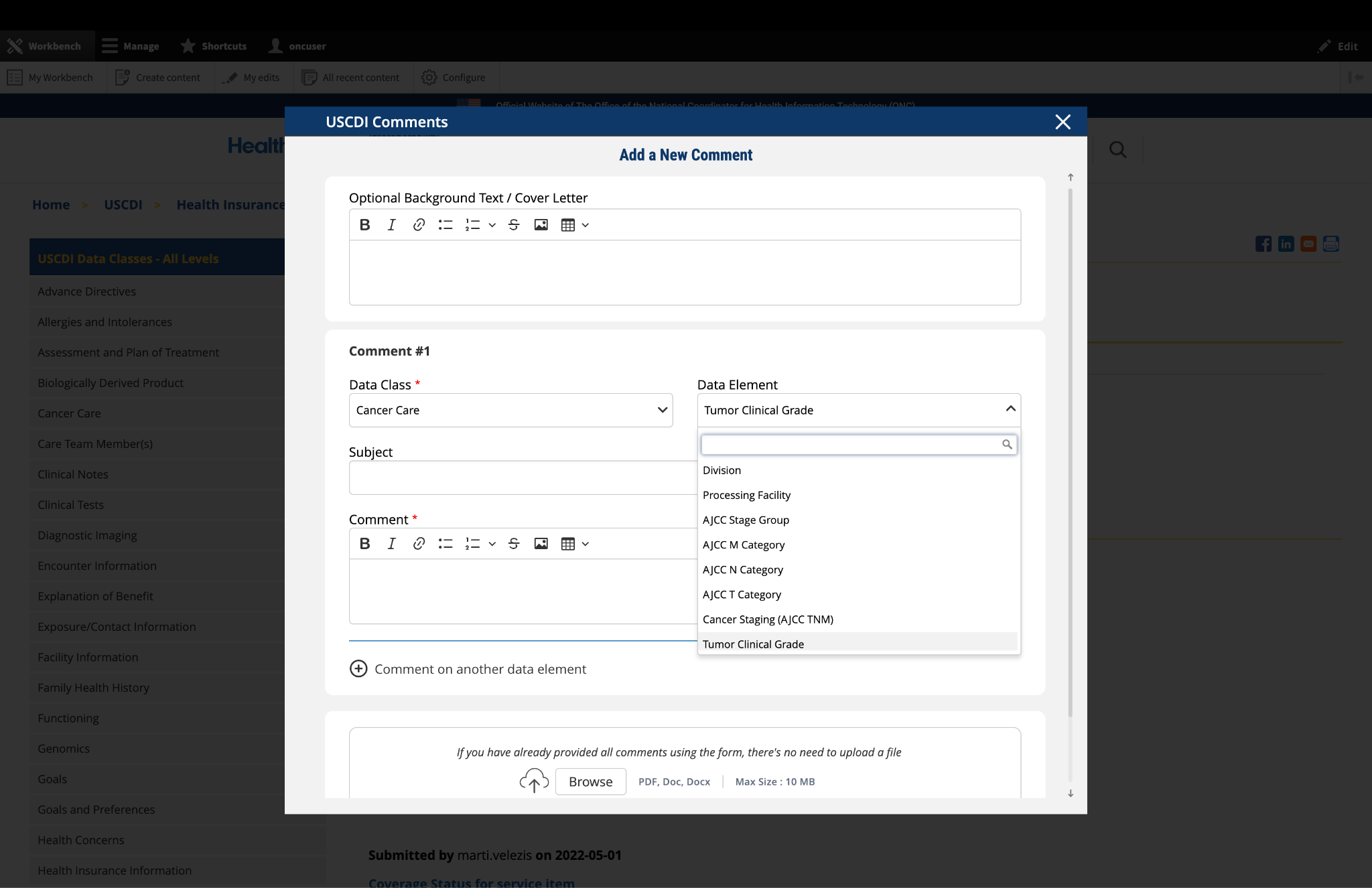
In the "Data Element" drop-down menu, select the specific data element you want to comment on.
The drop-down menu will display only the elements available under the data class you selected in the previous step.
You can use the search function within the drop-down to quickly locate a specific data element.
If you are commenting on the data class itself rather than a specific element, you may leave this field blank.
Note: Comments on a specific data element will appear on the respective data element page, while comments on a data class (without a specific element selected) will appear on the landing page for that data class.
Fig 1 The "Data Class" and "Data Element" dropdown menus allow users to specify the exact content they wish to comment on.
4. Optional: Propose New Data Class or Element
If you cannot find the appropriate data class or element for your comment:
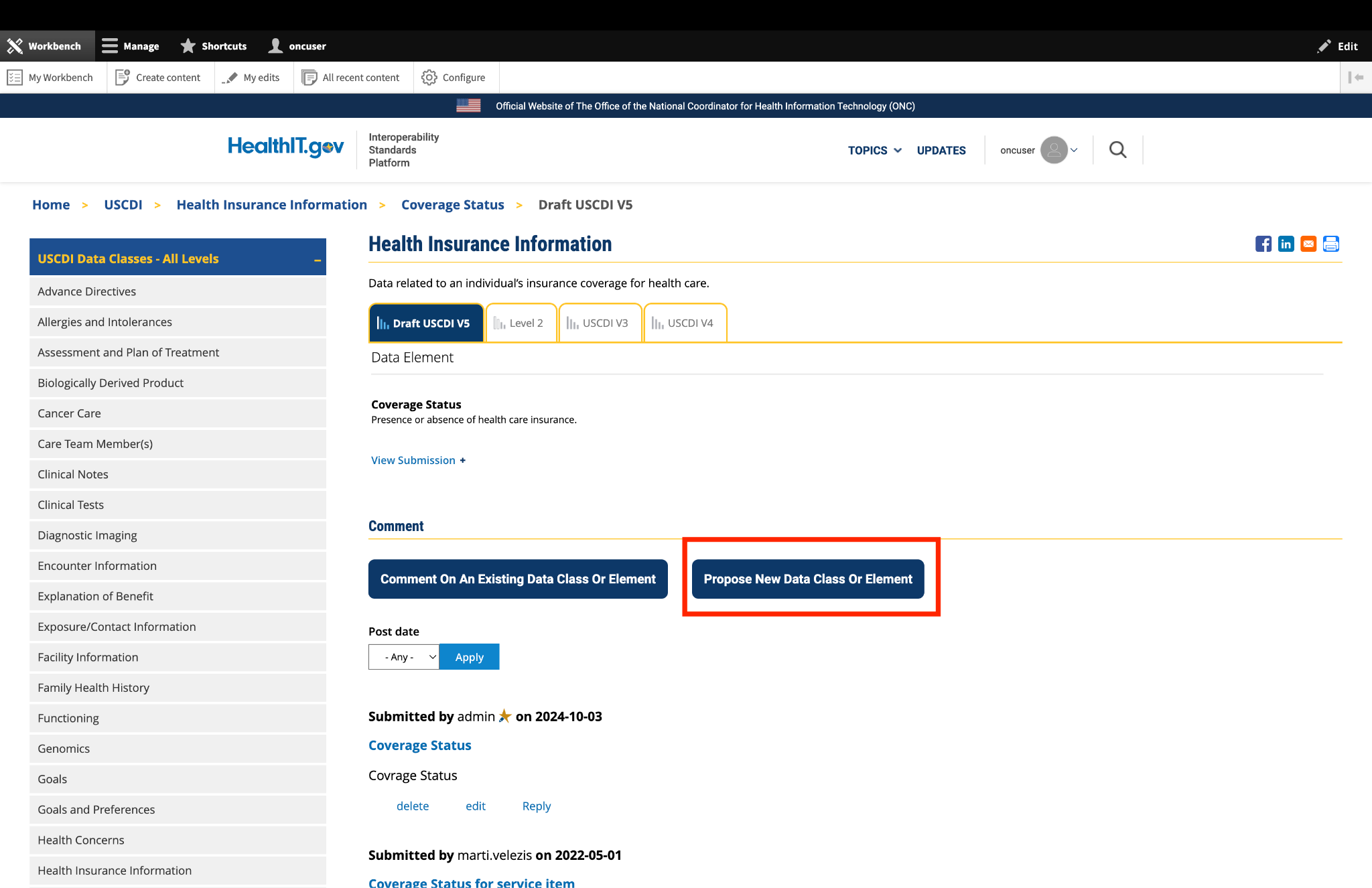
Instead of clicking the "Comment On An Existing Data Class Or Element" button, click the adjacent button labeled "Propose a New Data Class or Data Element."
This will redirect you to the ONDEC (ONC New Data Element and Class) Submission System.
In the ONDEC system, follow the provided instructions to submit your proposal for a new data class or element.
Once your proposal is submitted through ONDEC, it will be reviewed separately from the commenting process.
Fig 2 The "Propose a New Data Class or Data Element" button redirects users to the ONDEC Submission System for proposing new data elements not currently available in the system.
5. Complete the Comment Form
Fill out the required fields in the comment form:
Subject: Enter a brief, descriptive title that summarizes your comment. This helps reviewers quickly understand the nature of your feedback.
Comment: In this field, provide the full details of your comment or feedback. Be as clear and specific as possible about your suggestions, concerns, or observations. Include any relevant details that support your position.
6. Optional: Add Additional Comments
If you need to comment on multiple data classes or elements:
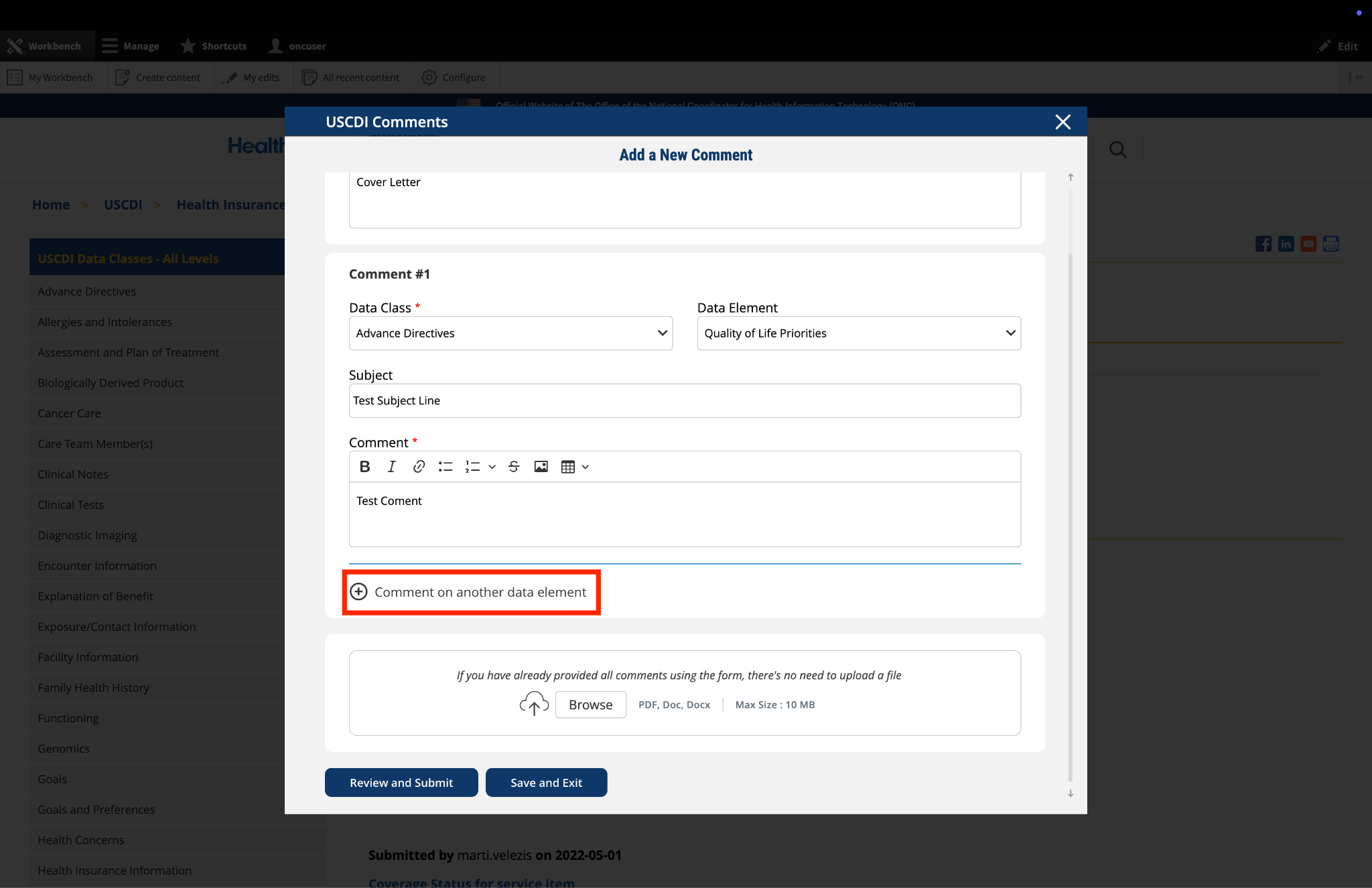
After completing your first comment, click the link labeled "Comment on another data element" at the bottom of the form.
A new comment section will appear, allowing you to enter details for your additional comment.
For each additional comment, you must select the appropriate data class and data element from the drop-down menus.
Complete the Subject and Comment fields for your additional comment.
Repeat this process for each additional comment you wish to submit.
Fig 3 The "Comment on another data element" link enables users to create multiple comments addressing different elements within a single submission.
7. Optional: Upload Supporting Files
The platform allows you to upload supporting documentation to enhance your comment:
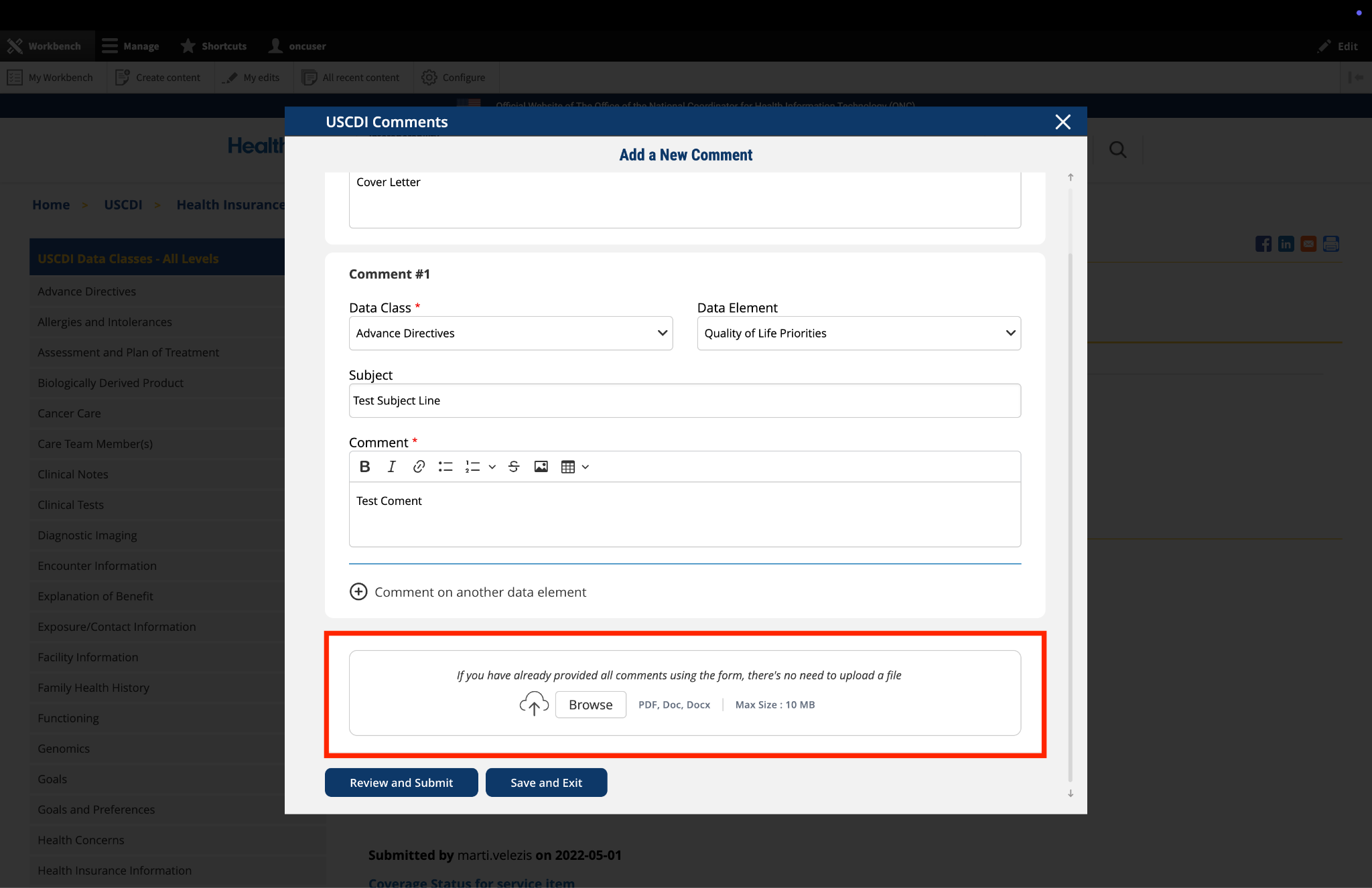
Locate the "File Upload" section at the bottom of the comment form.
Click to upload any files (such as PDFs or documents) that provide additional context, evidence, or clarification for your comment.
Important: If you have already entered your comments using the form fields, there is no need to upload duplicate content in PDF format. The file upload feature is intended for supplementary materials only. Please avoid uploading files that contain the same information already provided in your comment text.
Fig 4 The "File Upload" section permits users to attach supporting documentation that supplements their written comments.
8. Optional: Save and Exit
If you need to pause your work and return to complete your comment later:
Click the "Save and Exit" button at the bottom of the form.
Your comment will be saved as a draft that you can access and complete later.
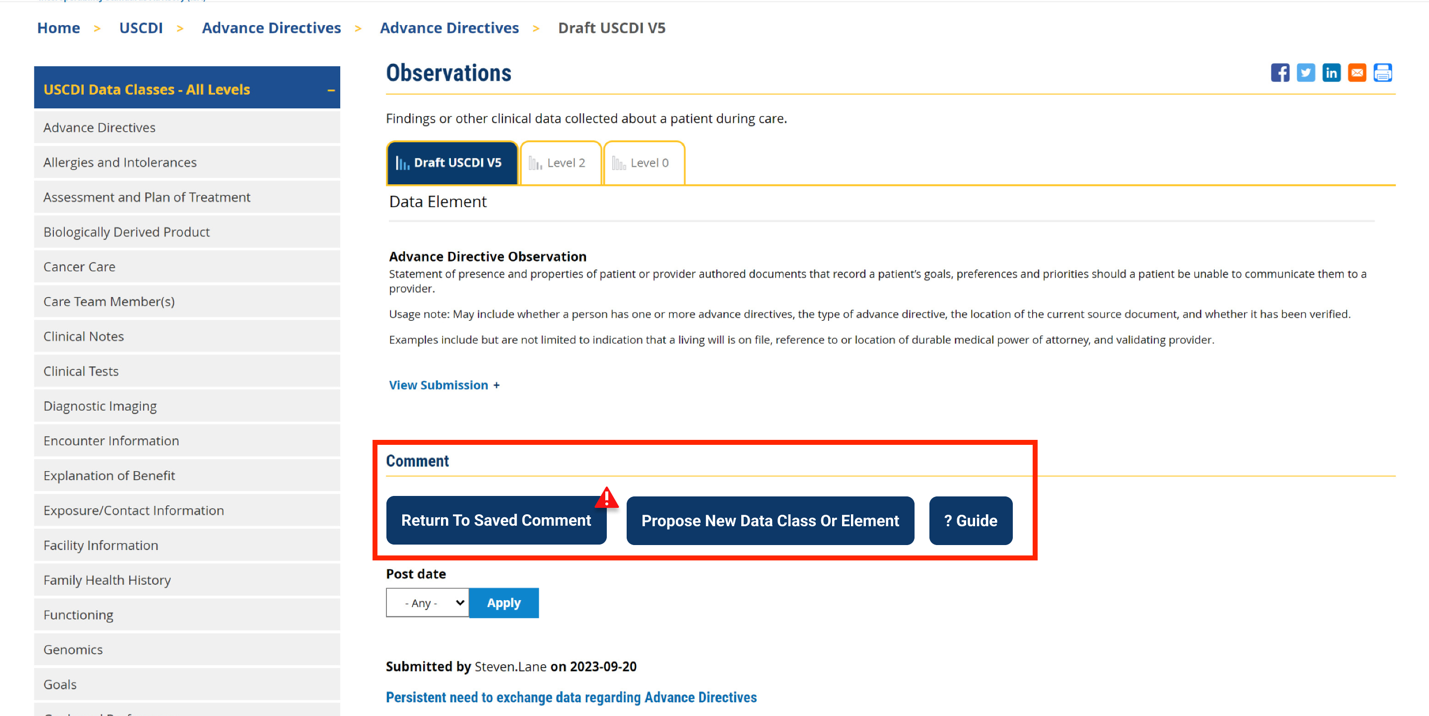
When you return to the platform, you will see a red triangle with an exclamation mark next to the “Return to saved Comment” button, indicating that you have saved comments in draft status.
Click this button to continue working on your draft.
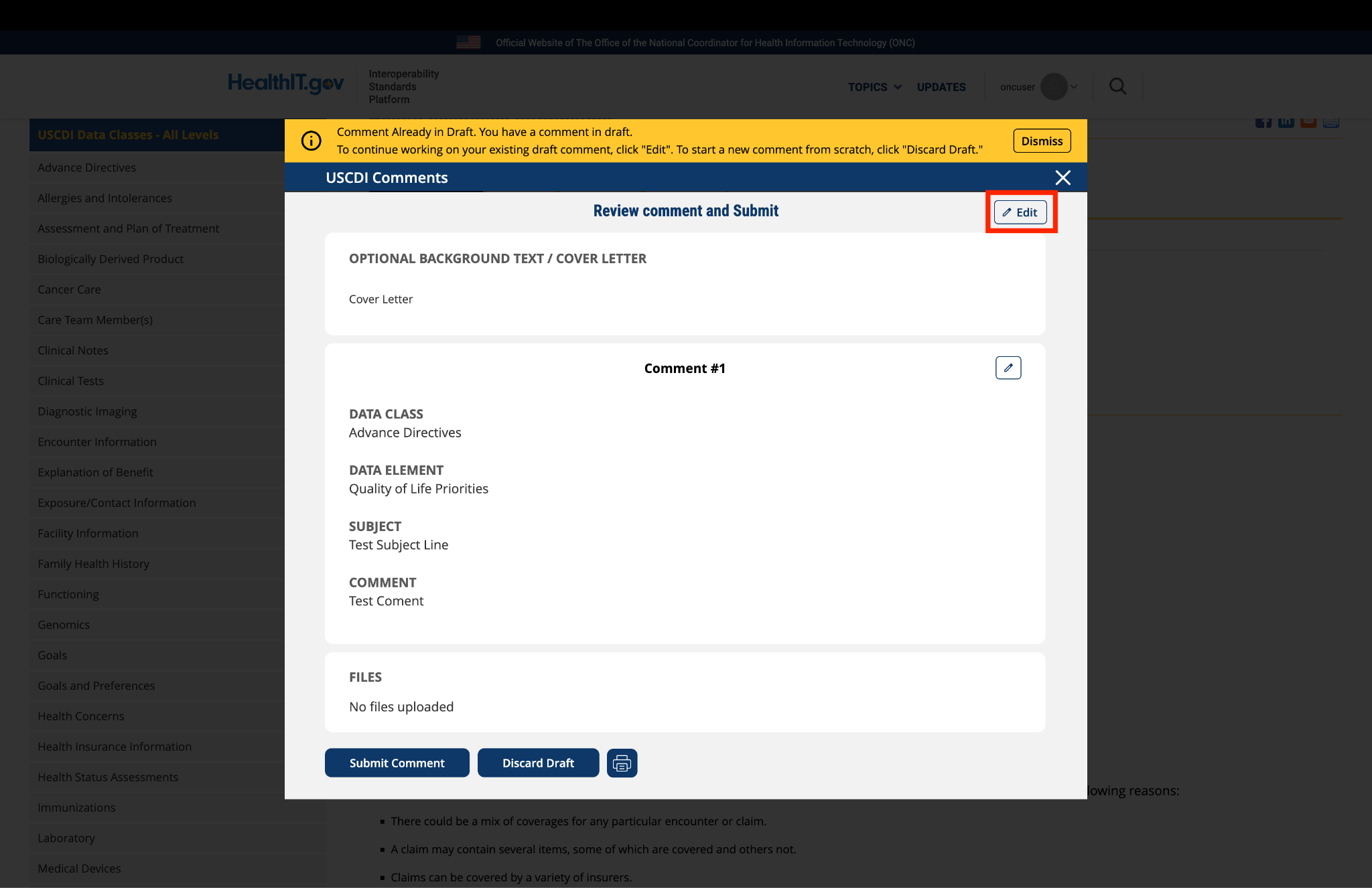
You will be taken to a review page where you can:
Select "Submit Comment" to officially submit your feedback.
Click "Edit" to return to the comment form and make changes
Select "Discard Draft" to delete the saved draft and start fresh
Fig 5 A red triangle with exclamation mark indicator appears next to the “Return to saved Comment” button when draft comments are saved in the system.
9. Review and Submit
Once you have completed your comment:
Click the "Review and Submit" button at the bottom of the form.
This will take you to a review screen displaying your comment(s) in full.
Review all information for accuracy and completeness.
On this review screen, you have three options:
Click "Submit Comment" to officially submit your feedback
Click "Edit" to return to the comment form and make changes
Click "Discard Draft" to delete the comment and start fresh
The review screen also includes a "Print" button that allows you to create a printed copy of your comments for your records.
If you choose to submit, your comment will be recorded in the system and made available for review by the appropriate stakeholders.
Fig 6 The review screen allows users to verify comment content and make any necessary modifications before final submission.
Submitted by jpatterson@mitre.org on
PACIO Recommends Advancing Nutrition Status to Level 2