Instrument, apparatus, machine, equipment, implant, software, hardware, or related component or accessory intended to diagnose, treat, cure, mitigate, or prevent disease, or to affect the structure or function of the body.
Submitted By: Joel Andress
/ Centers for Medicare and Medicaid Services (CMS) Center for Clinical Standards and Quality (CCSQ)
Data Element Information
Data Element Description
Devices are an identifiable grouping of mobility devices (i.e., wheelchairs), implantable devices (i.e., pace makers), or other wearable devices (i.e. compression socks or venous foot pump) with significant impact on patient functionality and health. The QDM v5.5 notes that “Device represents an instrument, apparatus, implement, machine, contrivance, implant, in-vitro reagent, or other similar or related article, including a component part or accessory, intended for use in the diagnosis, cure, mitigation, treatment, or prevention of disease and not dependent on being metabolized to achieve any of its primary intended purposes.”
Rationale for Separate Consideration
USCDI v1 includes UDIs for implantable devices. We recommend expanding this to include data exchange for devices used, but external and implantable.
Use Case Description(s)
Use Case Description
Device information, including devices applied/used is used extensively by hospitals, clinicians and providers submitting data for quality measurement. Device information is frequently used in quality measurement to identify frailty and advanced illness, but also used to identify health-care interventions for preventing, monitoring, or treating disease (i.e., an intermittent pneumatic compression device [IPC] for VTE prophylaxis or a cardiac pacemaker for heart failure).
The specific devices are currently reported as part of CMS quality measures:
• Frailty device indicators: wheelchair, walker, respiratory devices, continuous oxygen supply, identifier of confined to bed/chair
• Cardiac pacers
• Wearable devices: Graduated Compression socks, Intermittent pneumatic compression, venous foot pump
Estimate the breadth of applicability of the use case(s) for this data element
More than 4,000 hospitals and 1 million providers currently capture, access and exchange this device information. This information is currently electronically submitted by providers and hospitals to CMS for quality measurement.
eCQI resource center, includes measure specifications for CMS program eCQMs (i.e. CMS 190, CMS 125): https://ecqi.healthit.gov/ecqms
Data exchange of device information is also critical for clinical care. Clinician’s need to be aware of prior and recent healthcare interventions and the presence of implanted devices or use of external or mobility devices for optimal patient health-care provision.
Estimate the breadth of applicability of the use case(s) for this data element
Majority of hospitals and clinicians caring for patients should be capturing and exchanging this information.
Healthcare Aims
Improving patient experience of care (quality and/or satisfaction)
Improving the health of populations
Improving provider experience of care
Maturity of Use and Technical Specifications for Data Element
Applicable Standard(s)
SNOMED CT (Frailty Device, value set OID: 2.16.840.1.113883.3.464.1003.118.12.1300)
SNOMED CT (Intermittent Pneumatic Compression Devices (IPC), value set OID: 2.16.840.1.113883.3.117.1.7.1.214)
SNOMED CT (Graduated Compression Stockings (GSC), value set OID: 2.16.840.1.113883.3.117.1.7.1.256)
SNOMED CT (Venous Foot Pumps (VFP), value set OID: 2.16.840.1.113883.3.117.1.7.1.230)
SNOMED CT (Cardiac Pacer, value set OID: 2.16.840.1.113883.3.526.3.1193)
ICD-10-CM, SNOMED CT (Cardiac Pacer in Situ, value set OID: 2.16.840.1.113883.3.526.3.368)
5 or more. This data element has been tested at scale between multiple different production environments to support the majority of anticipated stakeholders.
Supporting Artifacts
Device information data for quality measurement is electronically exchanged from an organization’s EHR system to CMS for reporting and payment quality measurement programs, via QRDA files and other architectures. These device data elements have been tested for reliability and validity of capture during the development of CMS eCQMs and can be feasibly captured and exchanged. Ongoing testing for exchanging these data in FHIR standards via HL7 Connectathons.
ONC also requires the availability and exchange of implantable device UIDs, which can be broadened to include the devices used by a patient. https://ecqi.healthit.gov/qrda https://www.healthit.gov/test-method/implantable-device-list https://confluence.hl7.org/display/FHIR/2020-09+Clinical+Reasoning
Restrictions on Standardization (e.g. proprietary code)
No challenges anticipated. This data is available in standard terminology that can be publicly access via the VSAC and HL7.
Restrictions on Use (e.g. licensing, user fees)
We are not aware of any restrictions.
Privacy and Security Concerns
This data, like any patient data should be exchanged securely. Current processes exist, governed by CMS and ONC, to securely transfer this data element.
Estimate of Overall Burden
Device data is regularly captured by a broad range of healthcare providers, and should not cause excess burden to implement. Some burden may be required to expand the QI Core profiles available for this information to US Core.
Recommendation: CMS CCSQ recommends the Device Used element be added to final USCDI v6.
Rationale: CMS CCSQ advocates for the inclusion of the Device Used data element into the final USCDI v6, as it is a critical piece of information that is necessary in all care settings and includes devices such as hearing aids, communication devices, glasses, wheelchairs, prosthetics, adaptive utensils, oxygen concentrators, ventricular assistive devices, and many more. It supports completion of required patient assessments at admission and discharge, during long-term care, rehabilitation, and home health care. With established ontologies for medical devices in Systematized Nomenclature of Medicine (SNOMED) and LOINC, this data element is well-supported and ready for inclusion, ensuring that healthcare providers can effectively track and manage the diverse range of devices used by patients. CMS assessment tools leverage LOINC codes addressing use of devices such as a wheelchair or scooter, including: i. Does the patient use a wheelchair/scooter during assessment period (95738-1), ii. Wheel 50 feet with two turns usual functional ability during assessment period (94992-5), iii. Indicate the type of wheelchair/scooter used during assessment period (95739-9), iv. Wheel 150 feet – usual functional ability during assessment period (94991-7), v. Wheel 150 feet – functional goal (89377-6), Prior device use (83234-5), vi. Mobility devices normally used during assessment period (86602-0), Stairs (85072-7), vii. Hearing aid present & used (45499-1, Hearing aid present and not used regularly (45500-6), viii. Need for and availability of a hearing aid (94900-8), ix. Need for and availability of a communication device (94901-6) x. Number of days of training and skill practice in amputation or prosthesis care (45867-9).
Additionally, Device Used data are captured in a published FHIR IG titled Personal Functioning and Engagement (PFE) Implementation Guide v 1.0.0, and in another FHIR IG currently in ballot under the same title v 2.0.0, compliant with United States (US) Core 6.1.0. Including this data element in final USCDI v6 will facilitate efficient healthcare delivery by assisting providers in identifying critical healthcare interventions.
Recommendation: Advance Device Used from Level 2 to final USCDI V6.
Rationale: The PACIO Project Community* recommends advancing Device Used (Level 2) to USCDI V6. This recommendation aligns with the recommendation provided by (1) CMS-CCSQ, which “advocates for the inclusion of the Device Used data element into the final USCDI v6”, and (2) the Academy of Nutrition and Dietetics that Device Used which states that it represents a critical piece of information that spans every setting of care. Devices used in care can include both implantable or external devices used for a broad range of applications including hearing aids, cochlear implants, augmentative and alternative communication (AAC) devices, glasses, wheelchairs, walkers, canes, oxygen concentrators, adaptive utensils, adaptive drinking vessels, Ventricular Assist Devices (VADs), pacemakers, and many others. Device information is important to document and share across care settings, as many patients use devices to support not only their health but also everyday living, fall prevention, and rehabilitation.
While the Unique Device Identifier is already captured for implantable (but not external) devices, the clinical notion of what that device is, is not captured and it is not inclusive of external devices. Device Used would capture the “what” in a comprehensive and discreet way across all settings and be inclusive of both implantable and external devices. The codeable concepts are well established in both the SNOMED and LOINC ontologies and device used information is essential for supporting patients across care settings, including PAC, through better capture and sharing of this information.
These Device Used data are captured in a published FHIR IG titled Personal Functioning and Engagement v 1.0.0, and in another FHIR IG currently in ballot under the same title v 2.0.0, compliant with US Core 6.1.0.
* The PACIO (Post-Acute Care Interoperability) Project, established February 2019, is a collaborative effort between industry, government, and other stakeholders, with the goal of establishing a framework for the development of FHIR implementation guides to facilitate health information exchange.
Recommendation: Advance Device Used to the full draft of V6.
Rationale: The PACIO (Post-Acute Care Interoperability) Project, established February 2019, is a collaborative effort between industry, government, and other stakeholders, with the goal of establishing a framework for the development of FHIR implementation guides to facilitate health information exchange.
The PACIO Project agrees with the Academy of Nutrition and Dietetics that Device Used represents a critical piece of information that spans every setting of care. Patients use durable and single-use equipment for a broad range of applications including hearing aids, cochlear implants, augmentative and alternative communication devices, glasses, wheelchairs, walkers, canes, oxygen concentrators, adaptive utensils, adaptive drinking vessels, Ventricular Assist Devices (VADs), pacemakers, and many others.
While the Unique Device Identifier is already captured for implantable devices, the clinical notion of what that device is, is not captured. This data element would capture the “what” in a comprehensive and discreet way across all settings. The codeable concepts are well established in both the SNOMED and LOINC ontologies.
This information is captured in a published FHIR® IG titled Personal Functioning and Engagement.
Recommendation:Add the Device Used data element to Final USCDI v6.
Rationale: CMS advocates for the inclusion of the Device Used data element into the Final USCDI v6, as it a critical piece of information that is necessary in all care settings and includes devices such as hearing aids, communication devices, glasses, wheelchairs, prosthetics, adaptive utensils, oxygen concentrators, ventricular assistive devices, and many more. It supports completion of required patient assessments at admission and discharge, during long-term care, rehabilitation, and home health care. With established ontologies for medical devices in SNOMED and LOINC, this data element is well-supported and ready for inclusion, ensuring that healthcare providers can effectively track and manage the diverse range of devices used by patients. CMS assessment tools leverage LOINC codes addressing use of devices such as a wheelchair or scooter, including:
Does the patient use a wheelchair/scooter during assessment period (95738-1),
Wheel 50 feet with two turns usual functional ability during assessment period (94992-5),
Indicate the type of wheelchair/scooter used during assessment period (95739-9),
Wheel 150 feet – usual functional ability during assessment period (94991-7),
Mobility devices normally used during assessment period (86602-0), Stairs (85072-7),
Hearing aid present & used (45499-1, Hearing aid present and not used regularly (45500-6),
Need for and availability of a hearing aid (94900-8),
Need for and availability of a communication device (94901-6)
Number of days of training and skill practice in amputation or prosthesis care (45867-9).
Including this data element in Final USCDI v6 will facilitate efficient healthcare delivery by assisting providers in identifying critical healthcare interventions.
Discrete codes related to types of devices used by patients – specifically mobility (i.e., wheelchair), wearable (i.e., venous foot pump), and implantable devices (i.e., pacemaker)– are critical information that must travel with a patient to ensure safe, effective care, as these devices can have significant impact on a patient’s functionality and health. This data element can complement Disability Status data element (added to Draft v3), by providing additional information about devices used/needed by the patient to support participation in their care.
Maturity:
Current standards:
Extensive guidance exists in FHIR US Core and QI Core IGs for how to exchange device information (as observations, procedures)
Devices used concepts are captured in mature terminology: SNOMED, LOINC, HCPCS
Current uses, exchange, and use cases: This information continues to be widely captured and exchanged for nationwide CMS quality measurement. For example, it supports identification of disability (i.e., walking or hearing assistive devices) and/or frailty. Device use information is also critical information for prior authorization activities, as many DMEPOS require prior authorization.
Symmetric Health Solutions response to Level 2 comment: We support CMS comments calling for UDI-DI to be used to identify these devices for CMS quality reporting purposes and agree that most of these products include a UDI on the device label and have associated data in AccessGUDID. Some frailty devices fall under the FDA classification Class I. Currently, FDA has postponed the enforcement of the UDI regulatory requirements for Class I products until September 2022. We believe that this postponement should be reconsidered allow for quality reporting of these devices and to address concerns with supply chain transparency outlined in President Biden’s Executive Order calling for a Sustainable Public Health Supply Chain.
The "Optional Background Text / Cover Letter" field provides space for additional context or introductory information related to your comment.
If you wish to provide context, explanation, or an introduction to your comment, enter this information in the field labeled "Optional Background Text / Cover Letter." This is entirely optional and is most useful when submitting multiple related comments or when additional background would help reviewers understand your feedback.
If you are only commenting on a single data class or element, you may leave this field blank.
2. Select the Data Class
To specify which data class your comment addresses:
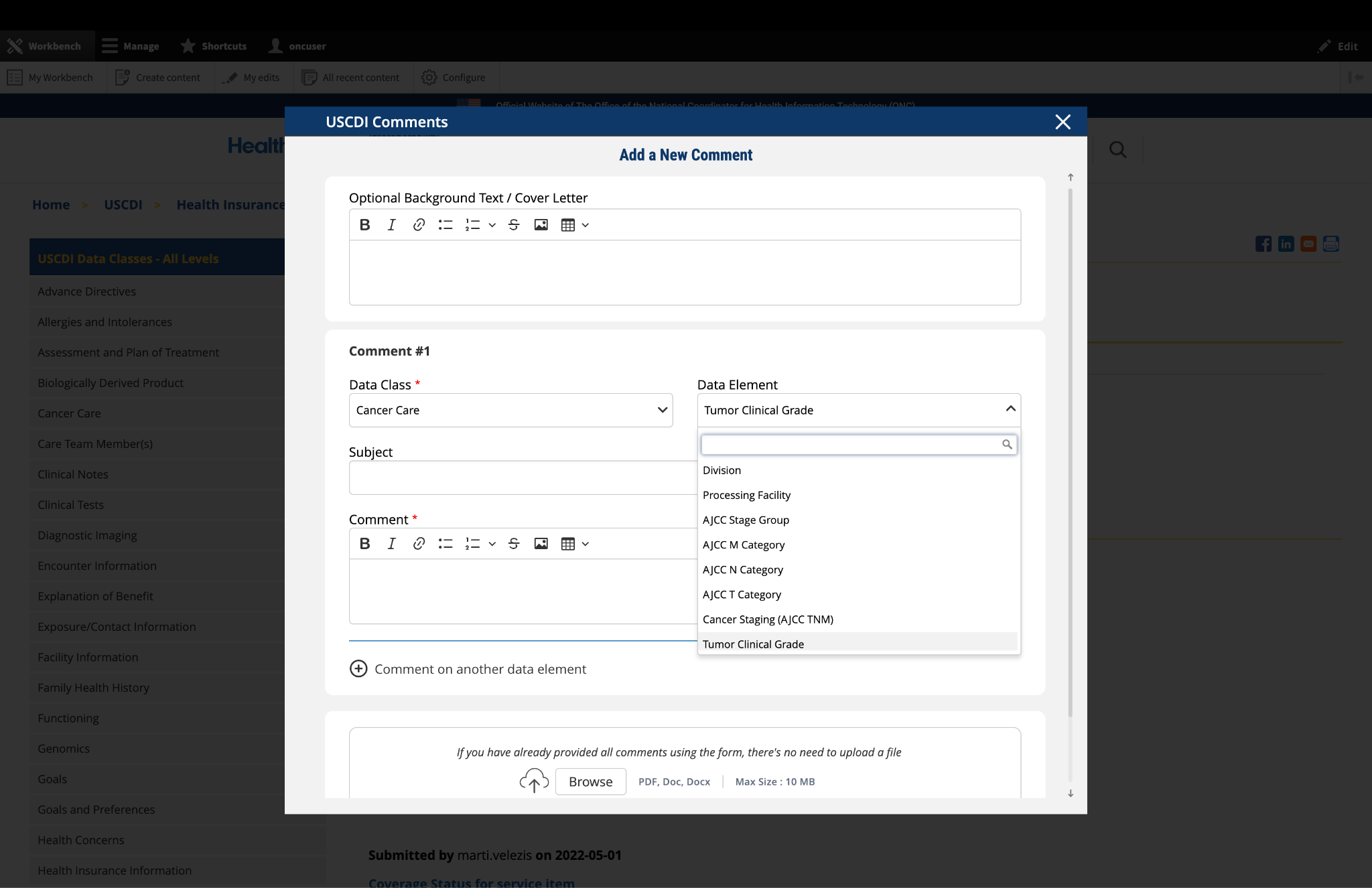
In the "Data Class" drop-down menu, select the appropriate data class you want to comment on.
If you are providing a general comment that is not specific to a data element, select "General" from the options. Comments with this designation will be displayed on the USCDI landing page.
Note that the Data Class field will automatically populate based on your current location in the platform:
If you are on a data class page, the field will be set to that specific data class
If you are on a data element page, the corresponding data class will be pre-selected
3. Select the Data Element
To specify which data element your comment addresses:
In the "Data Element" drop-down menu, select the specific data element you want to comment on.
The drop-down menu will display only the elements available under the data class you selected in the previous step.
You can use the search function within the drop-down to quickly locate a specific data element.
If you are commenting on the data class itself rather than a specific element, you may leave this field blank.
Note: Comments on a specific data element will appear on the respective data element page, while comments on a data class (without a specific element selected) will appear on the landing page for that data class.
Fig 1 The "Data Class" and "Data Element" dropdown menus allow users to specify the exact content they wish to comment on.
4. Optional: Propose New Data Class or Element
If you cannot find the appropriate data class or element for your comment:
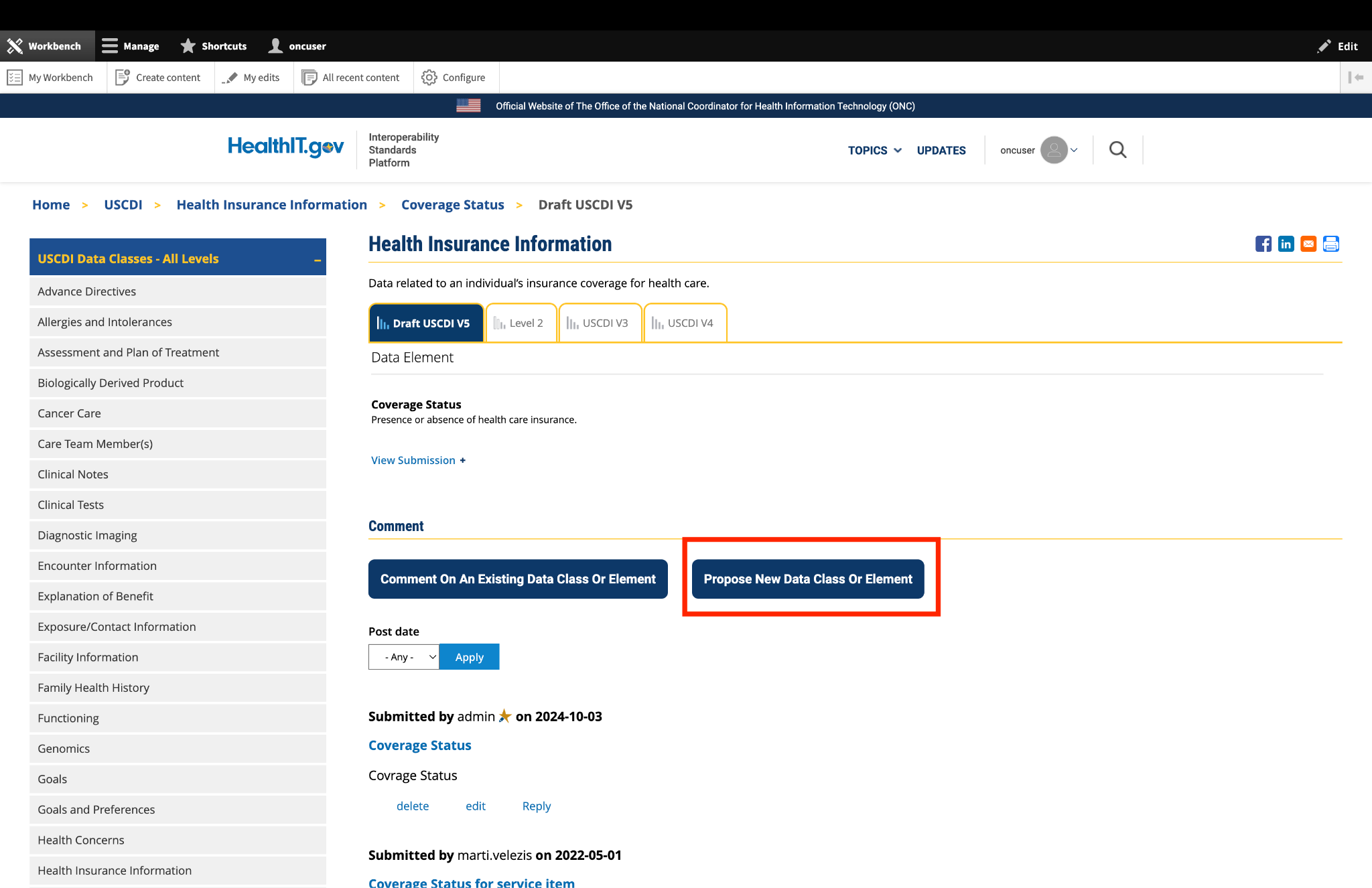
Instead of clicking the "Comment On An Existing Data Class Or Element" button, click the adjacent button labeled "Propose a New Data Class or Data Element."
This will redirect you to the ONDEC (ONC New Data Element and Class) Submission System.
In the ONDEC system, follow the provided instructions to submit your proposal for a new data class or element.
Once your proposal is submitted through ONDEC, it will be reviewed separately from the commenting process.
Fig 2 The "Propose a New Data Class or Data Element" button redirects users to the ONDEC Submission System for proposing new data elements not currently available in the system.
5. Complete the Comment Form
Fill out the required fields in the comment form:
Subject: Enter a brief, descriptive title that summarizes your comment. This helps reviewers quickly understand the nature of your feedback.
Comment: In this field, provide the full details of your comment or feedback. Be as clear and specific as possible about your suggestions, concerns, or observations. Include any relevant details that support your position.
6. Optional: Add Additional Comments
If you need to comment on multiple data classes or elements:
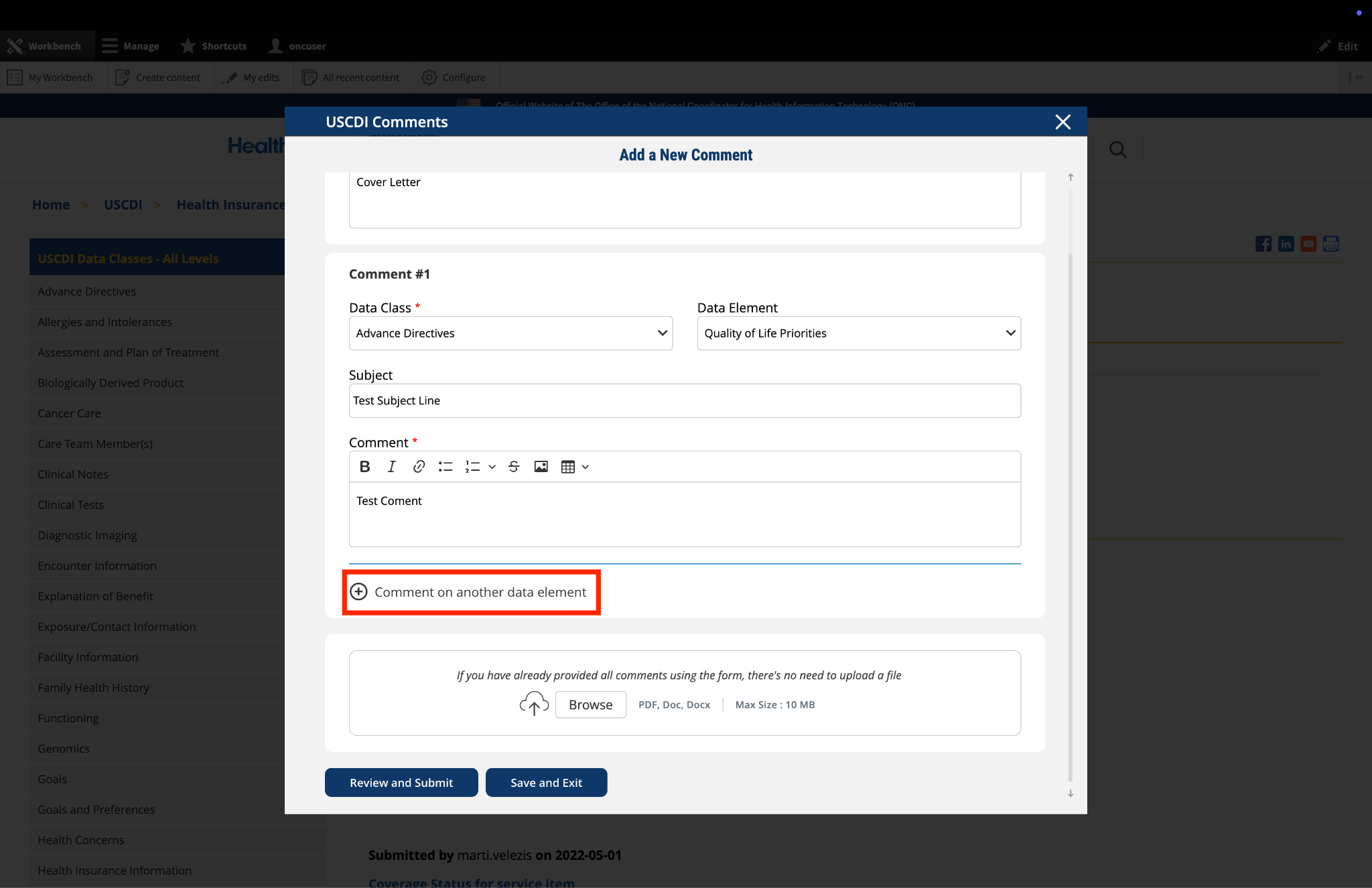
After completing your first comment, click the link labeled "Comment on another data element" at the bottom of the form.
A new comment section will appear, allowing you to enter details for your additional comment.
For each additional comment, you must select the appropriate data class and data element from the drop-down menus.
Complete the Subject and Comment fields for your additional comment.
Repeat this process for each additional comment you wish to submit.
Fig 3 The "Comment on another data element" link enables users to create multiple comments addressing different elements within a single submission.
7. Optional: Upload Supporting Files
The platform allows you to upload supporting documentation to enhance your comment:
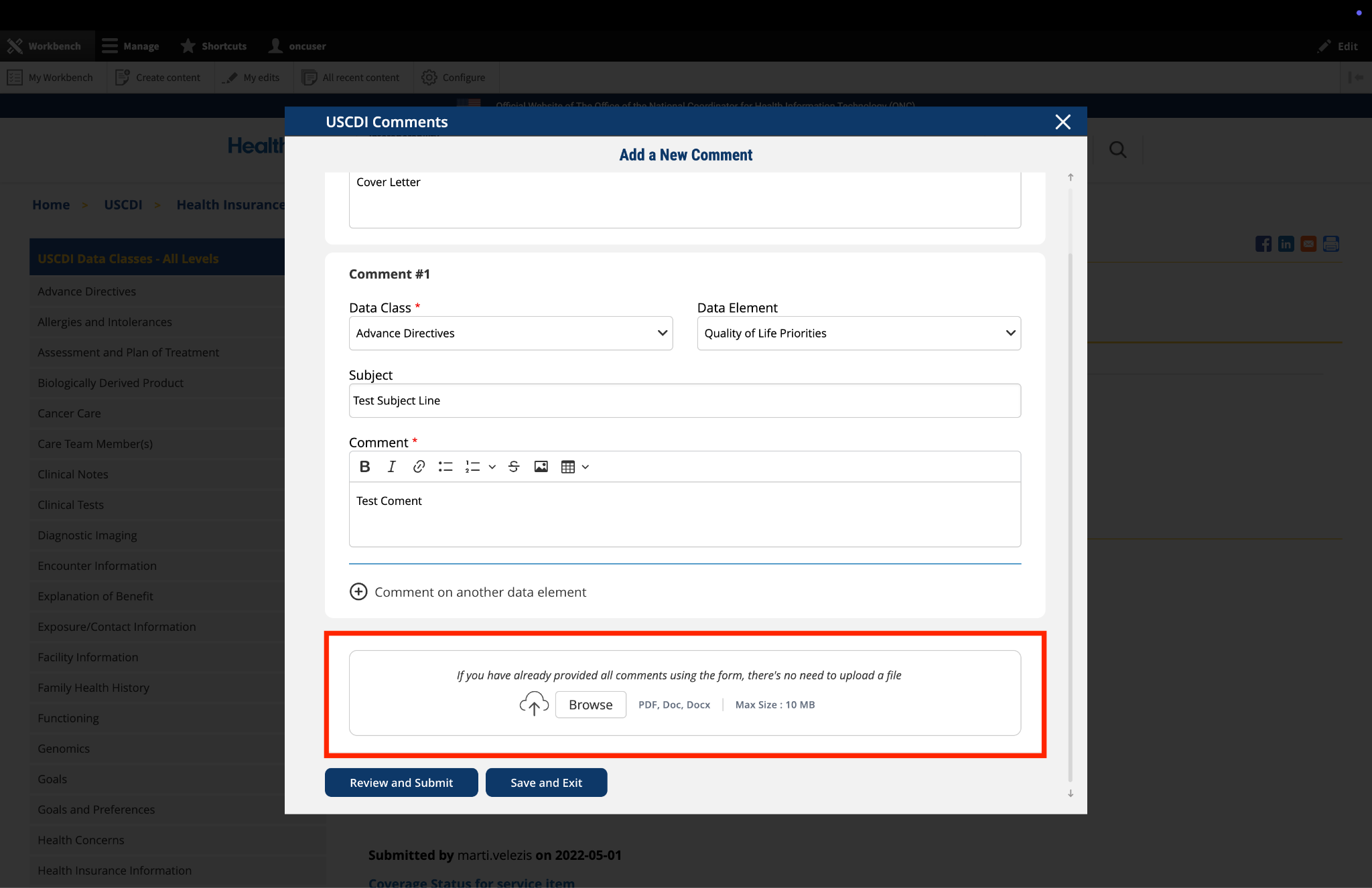
Locate the "File Upload" section at the bottom of the comment form.
Click to upload any files (such as PDFs or documents) that provide additional context, evidence, or clarification for your comment.
Important: If you have already entered your comments using the form fields, there is no need to upload duplicate content in PDF format. The file upload feature is intended for supplementary materials only. Please avoid uploading files that contain the same information already provided in your comment text.
Fig 4 The "File Upload" section permits users to attach supporting documentation that supplements their written comments.
8. Optional: Save and Exit
If you need to pause your work and return to complete your comment later:
Click the "Save and Exit" button at the bottom of the form.
Your comment will be saved as a draft that you can access and complete later.
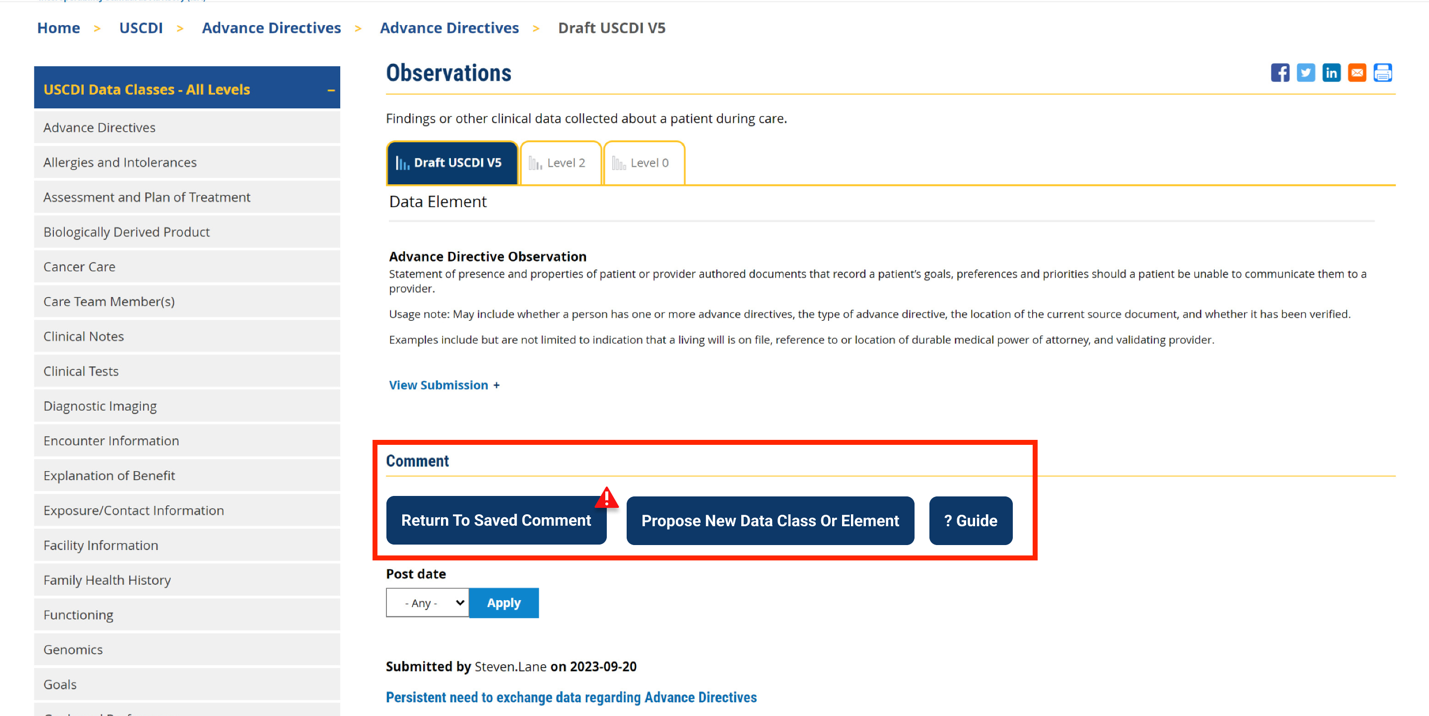
When you return to the platform, you will see a red triangle with an exclamation mark next to the “Return to saved Comment” button, indicating that you have saved comments in draft status.
Click this button to continue working on your draft.
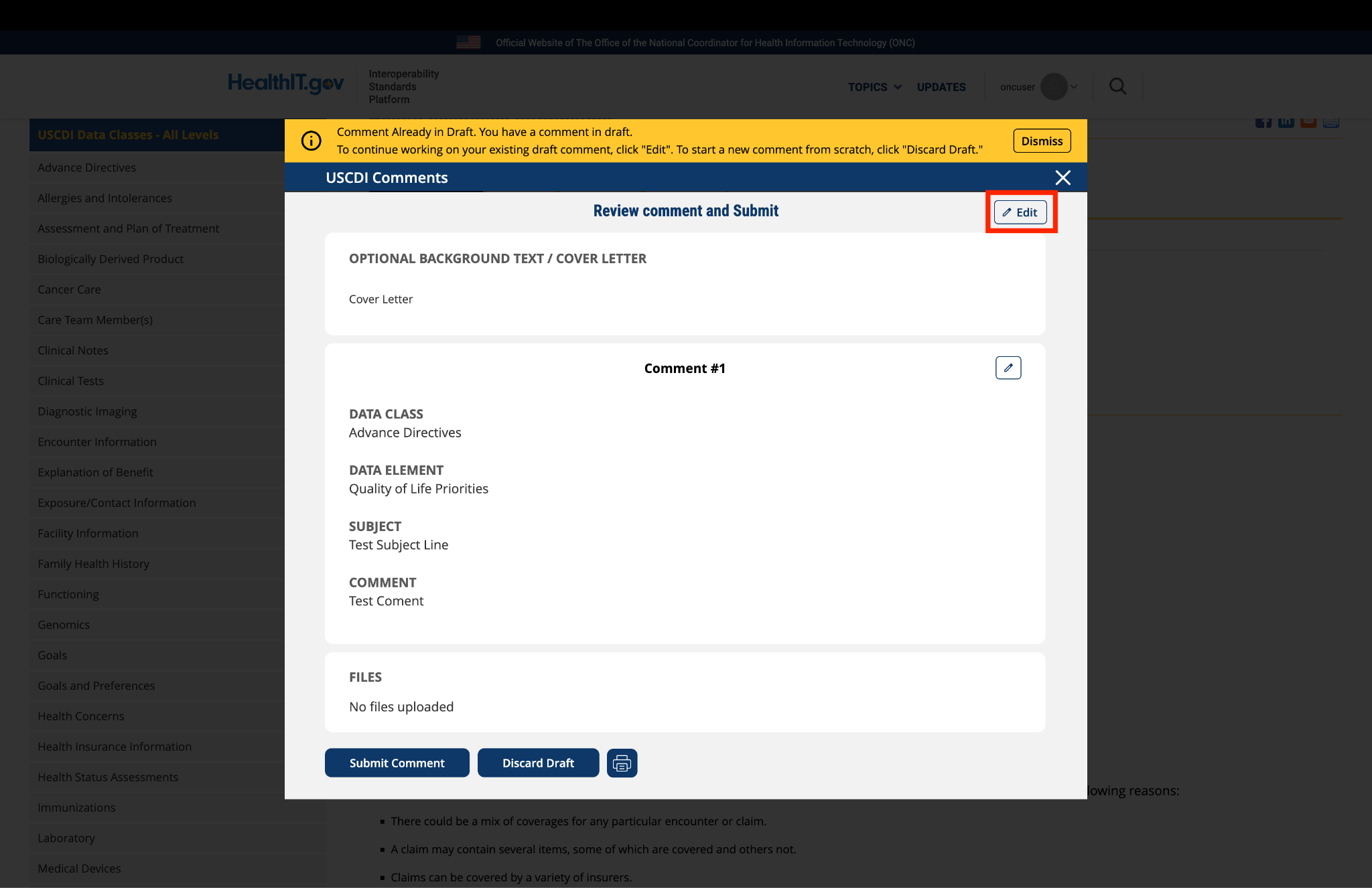
You will be taken to a review page where you can:
Select "Submit Comment" to officially submit your feedback.
Click "Edit" to return to the comment form and make changes
Select "Discard Draft" to delete the saved draft and start fresh
Fig 5 A red triangle with exclamation mark indicator appears next to the “Return to saved Comment” button when draft comments are saved in the system.
9. Review and Submit
Once you have completed your comment:
Click the "Review and Submit" button at the bottom of the form.
This will take you to a review screen displaying your comment(s) in full.
Review all information for accuracy and completeness.
On this review screen, you have three options:
Click "Submit Comment" to officially submit your feedback
Click "Edit" to return to the comment form and make changes
Click "Discard Draft" to delete the comment and start fresh
The review screen also includes a "Print" button that allows you to create a printed copy of your comments for your records.
If you choose to submit, your comment will be recorded in the system and made available for review by the appropriate stakeholders.
Fig 6 The review screen allows users to verify comment content and make any necessary modifications before final submission.
Submitted by rdillaire on
CMS-CCSQ Supports Device Used for USCDI v6
Recommendation: CMS CCSQ recommends the Device Used element be added to final USCDI v6.
Rationale: CMS CCSQ advocates for the inclusion of the Device Used data element into the final USCDI v6, as it is a critical piece of information that is necessary in all care settings and includes devices such as hearing aids, communication devices, glasses, wheelchairs, prosthetics, adaptive utensils, oxygen concentrators, ventricular assistive devices, and many more. It supports completion of required patient assessments at admission and discharge, during long-term care, rehabilitation, and home health care. With established ontologies for medical devices in Systematized Nomenclature of Medicine (SNOMED) and LOINC, this data element is well-supported and ready for inclusion, ensuring that healthcare providers can effectively track and manage the diverse range of devices used by patients. CMS assessment tools leverage LOINC codes addressing use of devices such as a wheelchair or scooter, including:
i. Does the patient use a wheelchair/scooter during assessment period (95738-1),
ii. Wheel 50 feet with two turns usual functional ability during assessment period (94992-5),
iii. Indicate the type of wheelchair/scooter used during assessment period (95739-9),
iv. Wheel 150 feet – usual functional ability during assessment period (94991-7),
v. Wheel 150 feet – functional goal (89377-6), Prior device use (83234-5),
vi. Mobility devices normally used during assessment period (86602-0), Stairs (85072-7),
vii. Hearing aid present & used (45499-1, Hearing aid present and not used regularly (45500-6),
viii. Need for and availability of a hearing aid (94900-8),
ix. Need for and availability of a communication device (94901-6)
x. Number of days of training and skill practice in amputation or prosthesis care (45867-9).
Additionally, Device Used data are captured in a published FHIR IG titled Personal Functioning and Engagement (PFE) Implementation Guide v 1.0.0, and in another FHIR IG currently in ballot under the same title v 2.0.0, compliant with United States (US) Core 6.1.0.
Including this data element in final USCDI v6 will facilitate efficient healthcare delivery by assisting providers in identifying critical healthcare interventions.