Description (*Please confirm or update this field for the new USCDI version*)
Time and/or date a procedure is performed.
Examples include but are not limited to vaccine or medication administration times, surgery start time, and time ultrasound performed.
Submitted By: Sheila Abner
/ CDC/NHSN
Data Element Information
Data Element Description
When the procedure was performed. Can be a point in time or a period of time with start and stop.
Use Case Description(s)
Use Case Description
Surgical site infections are reported to NHSN as part of nationwide healthcare-associated infections surveillance. Data reported to NHSN on surgical site infections associated with colon and abdominal hysterectomy operative procedures are submitted to CMS.
Data elements associated with orders for isolation / transmission precautions (status of patient on the following types of isolation precautions: contact, airborne, droplet) are needed for public health reporting on patients with suspected cases of contagious diseases. Feedback is requested regarding the most appropriate class for these data elements. Another option might be Encounter or possibly part of a new class such as Service Request.
Estimate the breadth of applicability of the use case(s) for this data element
Beginning 15 years ago with 300 hospitals, NHSN now serves approximately 25,000 medical facilities tracking HAIs. Current participants include acute care hospitals, long-term acute care hospitals, psychiatric hospitals, rehabilitation hospitals, outpatient dialysis centers, ambulatory surgery centers, and nursing homes, with hospitals and dialysis facilities representing the majority of facilities reporting data. Participation among the other facility types is expected to continue to grow in coming years.
5 or more. This data element has been tested at scale between multiple different production environments to support the majority of anticipated stakeholders.
Potential Challenges
Restrictions on Standardization (e.g. proprietary code)
none known
Restrictions on Use (e.g. licensing, user fees)
none known
Privacy and Security Concerns
none known
Estimate of Overall Burden
Moderate burden. Orders for isolation are currently irregularly implemented, so there is a need for more consistent documentation. Implementing appropriate transmission-based precautions is important for individual patient care as well as facility infection control. Easy access to isolation status of a patient for situational awareness is critical.
Recommendation: Broaden the examples to indicate that this element could also apply to care plan documentation, note documentation and health status assessments.
Rationale: While this element notes the stated care actions are only examples, we recommend broadening the examples to include a range of care activities to ensure performance time for all care activities are made available for exchange. Performance time is a critical attribute to understand relevant timing to other care activities and timeliness of care actions. Including additional examples related to clinical notes and care plans as well as health assessments will strengthen this element definition.
Evidence: This attribute should be available across all relevant data elements and is routinely captured in care workflows; US Core profiles include timing elements as ‘must have’ or ‘must support’ in nearly all profiles. Additionally, timing is critical for patient care and coordination for providers to understand how recent or relevant a piece of health information is in current care being provided; Timing is also critical and used across quality measures in all care settings to confirm a care action was completed in the timeframe being assessed.
A single Performance Date and Time may not adequately represent many procedural and perioperative workflows during a single case. During a single patient case, multiple procedures may be performed, each with its own distinct performance date and time. Capturing only one Performance Date and Time at the case level may result in the loss of clinically relevant information and limit interoperability.
We recommend that Performance Date and Time be associated with the individual procedure rather than the overall case and support multiple occurrences when multiple procedures are performed. This approach would:
Accurately represent cases involving multiple procedures during a single operative or procedural encounter.
Preserve the date and time associated with each specific procedure for clinical documentation, reporting, and care coordination.
Support consistent exchange of procedural information across EHRs and other health information systems.
This flexibility is particularly important in perioperative, interventional, and procedural settings where multiple procedures are commonly performed during the same patient encounter.
SHIELD supports the inclusion of this data element, however the current definition leaves room for interpretation depending on the type of care activity being documented and could be interpreted differently across different domains.
For in-vivo care activities Performance Date/Time also represents the temporal context of the patient’s state, i.e. the physiologically or clinically relevant date/ time, but for in-vitro activities like laboratory testing performance time, i.e. the date/time the results are created is different from the physiologically or clinically relevant date/ time, which in this case is the specimen collection date/time. So we need to decide what this element is expected to represent.
#A If the intent is to represent when the activity occurred then SHIELD suggests:
Update the name to “Performance Date/Time” with the existing definition
Update the Note to: “Examples include but are not limited to vaccine and medication administration date/times, surgery date/times, date/time ultrasound performed or laboratory test results are generated by an instrument or recorded by the laboratorian.”
In addition to this element, to ensure the capture of the biologically relevant time for in-vitro tests for the clinical context of the patient’s state the current level 0 element Specimen Collection Date/Time must be elevated into V7, because it is a required data element per CLIA for a test request (42 CFR Part 493 -- Laboratory Requirements ). Also this element has been exchanged in HL7 V2 messages as OBR-7 (Observation Date/Time for the start date/time) and SPM-17 (Specimen Collection Date/Time covering start and end date/time with the date range datatype) and is represented in FHIR Specimen.collection.collectedDate/time or Specimen.collection.collectedPeriod).
Guidance should be provided that this element captures the start and end date/times (periods) for longer care activities. If that is not the intent, then update the name to “Performance Start Date/Time” and add another data element to allow recording of the end of a care activity named “Performance End Date/Time” and adjust the definitions accordingly.
#B If the intent is to represent the date/time important to understand the patient’s clinical state, then SHIELD suggests:
Update the name to: “Biologically Relevant Date/Time”
Update the definition to: “Date/time that provides the temporal context about the patient’s state (physiological or psychological) at the time the care activity takes place or provides diagnostic insights about.”
Update the Note to: “For in-vivo care activities like vaccine and medication administration, surgery, ultrasound performed, vital signs documentation as well a health status assessments this date/time is equivalent to the performance date/time. For in-vitro care activities like laboratory testing, this is the date/time of specimen collection.”
To ensure the capture the performance date/time of the lab test add the new element “Laboratory Test Performed Date/Time" with the definition: "Date (and optionally time) when the instrument or technologist (for manual testing) generated the result.” with the Usage Note: "This is the date/time when the results are generated by an instrument or recorded by the laboratory technologist."
Guidance should be provided that this element captures the start and end date/times (periods) for longer care activities. If that is not the intent, then update the name to “Biologically Relevant Start Date/Time” and add another data element to allow recording of the end of a care activity named “Biologically Relevant End Date/Time” and adjust the definitions accordingly.
The current name is not intuitive without looking at the examples, which will lead to differing interpretations across care domains. For in-vivo care activities, Performance Date/Time also represents the temporal context of the patient’s state, i.e. the physiologically or clinically relevant date/ time, but for in-vitro activities like laboratory testing Performance Date/Time, the date/time the results are created is different from the physiologically or clinically relevant date/ time, which in this case is the specimen collection date/time. Thus, ONC needs to decide what this element is expected to represent.
Healthcare has long exchanged clinically relevant date/time in HL7 v2 messages using OBR-7 (Observation Date/Time), defined as: “This field is the clinically relevant date/time of the observation. In the case of observations taken directly from a subject, it is the actual date and time the observation was obtained. In the case of a specimen-associated study, this field shall represent the date and time the specimen was collected or obtained.” APHL therefore advocates for renaming this data element to “Clinically Relevant Date/Time”.
APHL further recommends updating the definition to: “Date/time that provides the temporal context about the patient’s state (physiological or psychological) at the time the care activity takes place or provides diagnostic insights about.” The notes should be updated to: “For in-vivo care activities like vaccine and medication administration, surgery, ultrasound performed, vital signs documentation as well a health status assessments this date/time is equivalent to the performance date/time. For in-vitro care activities like laboratory testing, this is the date/time of specimen collection.”
Because care activities can be of prolonged duration, for example a surgery or collection of specimen over several hours, clarification should also be provided that this data element can cover longer care activities by capturing the start and end date/times. If that is not the intent, then ONC should update the name to “Clinically Relevant Start Date/Time” and add another data element to allow recording of the end of a care activity named “Clinically Relevant End Date/Time” and adjust the definitions accordingly. OBR-8 (Observation End Date/Time) has been used in HL7 V2 messages for a long time to capture this element; in later versions, with the introduction of the SPM segment to capture specimen attributes, SPM-17 (Specimen Collection Date/Time) uses a date range datatype that captures both start and end date in a single element.
APHL suggests that ONC support synonyms for USCDI data elements, and for this element the synonym “Specimen Collection Date/Time” should be added.
Currently, there is no single HL7 defined data element to capture performance date/time for in-vitro care activities that is represented across all HL7 product families, as there are several aspects that need to be considered. These considerations include distinguishing when the actual result is produced by the instrument and when the results are verified and released by the laboratory, making them clinically actionable. To avoid any confusion about which date/time is being exchanged APHL suggests adding two new data elements:
“Laboratory Test Performed Date/Time" with the definition: "Date (and optionally time) when the instrument or technologist (for manual testing) generated the result.” and with the usage notes: "This is the date/time when the results are generated by an instrument or recorded by the laboratory technologist."
"Result Released Date/Time” with the definition: "Date (and optionally time) when the result was verified and released by the testing laboratory.” and with this usage notes: "The date/time when the results are verified and available for exchange."
CDC supports the inclusion of the following USCDI Data Elements in the final version of USCDI V7:
Performance Time (Health Care Information Attributes Class)
Diagnostic Report Date (Health Care Information Attributes Class)
Based on the Performance Time element definition, Specimen Collection Date/Time is also reflected in this data element. Specimen Collection Date/Time is a critically important data element for both the laboratory and clinical practice to establish the time a specimen is obtained from the subject patient. It is currently exchanged by both EHR and LIMS/LIS vendors throughout the country. It is also required by CLIA (42 CFR 493.1241(c)(6) (https://www.ecfr.gov/current/title-42/chapter-IV/subchapter-G/part-493/subpart-K/subject-group-ECFR5f8f0b6639946fd/section-493.1241#p-493.1241(c)(6)).
Diagnostic Report Date can be used to exchange Test Result Report Date/Time, which is an important element in clinical care covered under CLIA (42 CFR 493.1291(c)(3)) (https://www.ecfr.gov/current/title-42/part-493/section-493.1291#p-493.1291(c)(3)). CDC proposes that ASTP adds a usage note to indicate that this data element may change each time a new version of the report is released (e.g., preliminary, final, corrected, amended, and addended) and the timestamp should be preserved for each released report.
The Following use cases highlight the importance of these elements across clinical scenarios.
Use Case 1:
Procalcitonin (PCT) is frequently used as a biomarker to support antibiotic stewardship (especially early discontinuation of antibiotics) and, in some settings, for risk stratification. The evidence base on pre-analytical delay (i.e, time from specimen collection to when the test is performed in the laboratory) shows that PCT is not infinitely stable and usually shows bias with prolonged warm storage; however, the size of the bias depends on matrix (serum/plasma/whole blood), specimen handling, temperature, and assay platform. Key primary studies show a measurable decline (about 12% lower) within 24 hours at room temperature on older platforms 1. Because common cutoffs are close together (0.10, 0.25, 0.5, 2.0 µg/L) and real-world PCT interpretation includes analytical and biological variability of ~10–30%, plausible pre-analytical degradation at the 10–30% level can move results across decision boundaries2. Clinically, this patient safety risk is most consequential when PCT is used to stop or withhold antibiotics (where falsely low values could accelerate discontinuation).
At the bedside, decision-making by clinicians could be impacted by (1) “older samples” may be biased low and (2) inconsistency in sample age across serial draws can distort trends. Knowing the specimen collection time and test run time is clinically relevant to making critical clinical decisions especially when PCT is being used at or near decision thresholds.
Chockalingam L, Mee T, Gardner T, Grimm E, Baduashvili A. Real-world interpretation of procalcitonin to guide antibiotic prescribing: a retrospective cohort study with regression discontinuity analysis. Antimicrob Steward Healthc Epidemiol. 2025 May 28;5(1):e119. doi: 10.1017/ash.2025.72. PMID: 40453517; PMCID: PMC12122395.
Use Case 2:
A study found that the length of time before centrifugation determined the degree of hemolysis in blood samples collected for serum lactate dehydrogenase testing1. If whole blood sits warm, uncentrifuged, transported roughly, or is drawn through IV lines, the potential for hemolysis is increased which may likely trigger assay interference. Bilirubin thresholds anchor high-stakes decisions (e.g., ICU organ failure scores, neonatal escalation of care) and clinicians should repeat testing when a result is near a decision boundary, especially if the sample may be aged/hemolyzed. The inclusion of sample collection time, testing time, and result report time in laboratory reports is essential as that may be the only indication that a borderline test should be repeated.
References
Tamechika Y, Iwatani Y, Tohyama K, Ichihara K. Insufficient filling of vacuum tubes as a cause of microhemolysis and elevated serum lactate dehydrogenase levels. Use of a data-mining technique in evaluation of questionable laboratory test results. Clin Chem Lab Med. 2006;44(5):657-61. doi: 10.1515/CCLM.2006.109. PMID: 16681441.
Use Case 3:
In Emergency Departments (EDs), when a patient is admitted with chest pain, an algorithm is activated, to diagnose and treat the patient for Myocardial Infarction as quickly as possible to prevent further heart damage. An extended interval from blood draw to specimen processing to laboratory testing affects care impacts patient care in many ways including delaying or prolonging observation, slowing delivery of relevant procedures, and reducing the practicality of rapid rule-out pathways. Delays in sample processing can also affect sample integrity where hemolysis and matrix effects can bias results, especially near low high-sensitivity cardiac troponin T (hscTn) cut points and “delta” thresholds. Hemolysis, which can increase with handling/transport and delayed processing, can cause clinically meaningful negative interference in some hscTn assays (reported up to 3 ng/L or 13% falsely low recovery at hemolysis levels routinely encountered), potentially affecting clinical decisions1.
An analysis of ED troponin testing turnaround time (TAT) found that the median overall TAT is 83 min instead of recommended 60 min, with pre-analytic steps contributing ~52% of the total time and accounting for most extreme delays2. Knowing the TAT, especially when the hscTn is near the cutoff, could be important for clinical decision-making, highlighting the importance of both specimen collection time and test run and/or result reporting time in the test result report.
References
Harley K, Bissonnette S, Inzitari R, Schulz K, Apple FS, Kavsak PA, Gunsolus IL. Independent and combined effects of biotin and hemolysis on high-sensitivity cardiac troponin assays. Clin Chem Lab Med. 2021 Mar 25;59(8):1431-1443. doi: 10.1515/cclm-2021-0124. PMID: 33761581.
Kirby L. Pereira, Mary Hotaling, Monitoring of Troponin Turnaround Time Metrics Within Emergency Department Visits, American Journal of Clinical Pathology, Volume 138, Issue suppl_2, 1 November 2012, Page A371, https://doi.org/10.1093/ajcp/138.suppl2.205
Use case 4:
A study examined how delayed processing of blood samples influenced time to positivity of blood cultures and results of gram stain-acridine orange leukocyte cytospin tests (AOLC). 24-hour storage of blood culture bottles at room temperature markedly influenced the time to positivity. In samples cultured in aerobic BACTEC bottles, storing with fast-growing strains (e.g., E. coli) with high bacterial loads for 24 hours at room temperature inhibited microbial detection. In clinical practice, this could lead to false-negative differential time to positivity (DTP). In other types of culture bottles, 24-hour storage at room temperature can lead to false-positive Gram stain-AOLC test results due to an increase in microbial load1. Therefore, it is essential that the clinician know the date and time the specimen was drawn and the time received in the laboratory to fully understand test results.
References.
Schwetz I, Hinrichs G, Reisinger EC, Krejs GJ, Olschewski H, Krause R. Delayed processing of blood samples influences time to positivity of blood cultures and results of Gram stain-acridine orange leukocyte Cytospin test. J Clin Microbiol. 2007 Aug;45(8):2691-4. doi: 10.1128/JCM.00085-07. Epub 2007 May 30. PMID: 17537945; PMCID: PMC1951239.
Use case 5:
Serial testing of serum thyroglobulin levels (postoperative): Elevated levels are a strong indicator of tumor recurrence in patients with differentiated thyroid cancer; these findings are most sensitive in the presence of hypothyroidism and elevated thyroid -stimulating hormone (TSH) levels. For long-term monitoring, measurements of thyroglobulin and antithyroglobulin antibodies should be obtained. The date and time the specimen is collected and the date results are reported are essential to tracking levels and coordinating results with scans and fine needle aspiration (FNA) biopsy findings especially when FNA findings are indeterminate.
In the Draft USCDI v7, while its definition remains unchanged, the “Performance Time” data element has been moved from the “Procedures” data class to the newly created “Healthcare Information Attributes” data class.[1] Vizient supports relocating the “Performance Time” data element, as it broadens its applicability by allowing the data element to be associated not only with procedures but with a wider range of clinical activities. This shift enhances the flexibility and usefulness of the data element across multiple clinical contexts and aligns with how performance‑related timestamps are used in practice.
[1] The definition remains “Time and/or date an activity is performed. Examples include but are not limited to vaccine or medication administration times, surgery start time, time ultrasound performed, and laboratory specimen collection time.”
Recommendation: Broaden the examples to indicate that this element could also apply to care plan documentation, note documentation and health status assessments.
Rationale: While this element notes the stated care actions are only examples, we recommend broadening the examples to include a range of care activities to ensure performance time for all care activities are made available for exchange. Performance time is a critical attribute to understand relevant timing to other care activities and timeliness of care actions. This attribute should be available across all relevant data elements; including additional examples related to clinical notes and care plans as well as health assessments will strengthen this element definition.
The CDC appreciates the inclusion of the “Performance Time” data element in USCDI but recommends clarification and reconsideration of its scope and applicability. While the element is intended to capture the time a procedure is performed, we have found that in real-world practice, this data is often not consistently available or exchanged across systems. Additionally, the current description lists “medication administration time” as an example, which is problematic. Medication administration is a distinct clinical event that is not reliably or appropriately captured under the Procedures data class or through a generalized timing element.
The HL7 FHIR MedicationAdministration resource is specifically designed to capture the date and time a medication is administered, and it is not interchangeable with procedure timing. Using Performance Time to represent medication administration risks conflating fundamentally different clinical concepts and may lead to inaccurate or incomplete data capture for public health surveillance and quality measurement.
We recommend that ASTP clarify the intended scope of Performance Time and avoid using medication administration as an example under this element.
Recommendation: CMS CCSQ supports CDC’s comment that Performance Time is insufficient for capturing Medication Administration Time which is currently referenced as an example for this data element.
Rationale: Reference CMS CCSQ’s comments posted on the Medication Administration data elements under the Medications data class for CCSQ’s rationale on where Medication Administration information should be captured.
Recommendation: CMS CCSQ requests clarification be provided for the Performance Time data element regarding the types of times that could be captured. While CMS CCSQ supports the inclusion of a data element for the collection and exchange of medication administration date and time, CMS notes medication administration date and time would be more appropriate for inclusion in the Medication data class, rather than the Procedures data class.
The "Optional Background Text / Cover Letter" field provides space for additional context or introductory information related to your comment.
If you wish to provide context, explanation, or an introduction to your comment, enter this information in the field labeled "Optional Background Text / Cover Letter." This is entirely optional and is most useful when submitting multiple related comments or when additional background would help reviewers understand your feedback.
If you are only commenting on a single data class or element, you may leave this field blank.
2. Select the Data Class
To specify which data class your comment addresses:
In the "Data Class" drop-down menu, select the appropriate data class you want to comment on.
If you are providing a general comment that is not specific to a data element, select "General" from the options. Comments with this designation will be displayed on the USCDI landing page.
Note that the Data Class field will automatically populate based on your current location in the platform:
If you are on a data class page, the field will be set to that specific data class
If you are on a data element page, the corresponding data class will be pre-selected
3. Select the Data Element
To specify which data element your comment addresses:
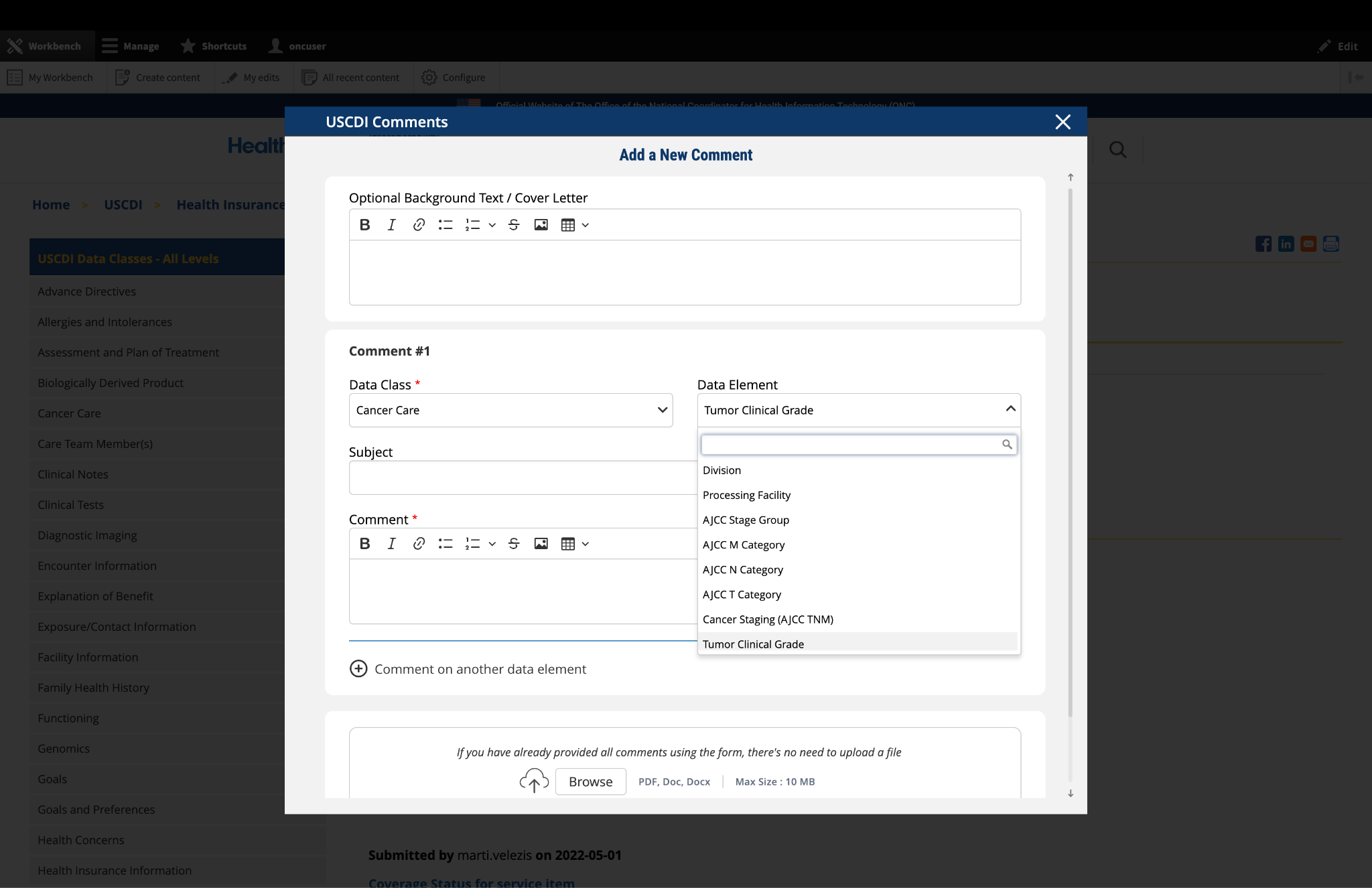
In the "Data Element" drop-down menu, select the specific data element you want to comment on.
The drop-down menu will display only the elements available under the data class you selected in the previous step.
You can use the search function within the drop-down to quickly locate a specific data element.
If you are commenting on the data class itself rather than a specific element, you may leave this field blank.
Note: Comments on a specific data element will appear on the respective data element page, while comments on a data class (without a specific element selected) will appear on the landing page for that data class.
Fig 1 The "Data Class" and "Data Element" dropdown menus allow users to specify the exact content they wish to comment on.
4. Optional: Propose New Data Class or Element
If you cannot find the appropriate data class or element for your comment:
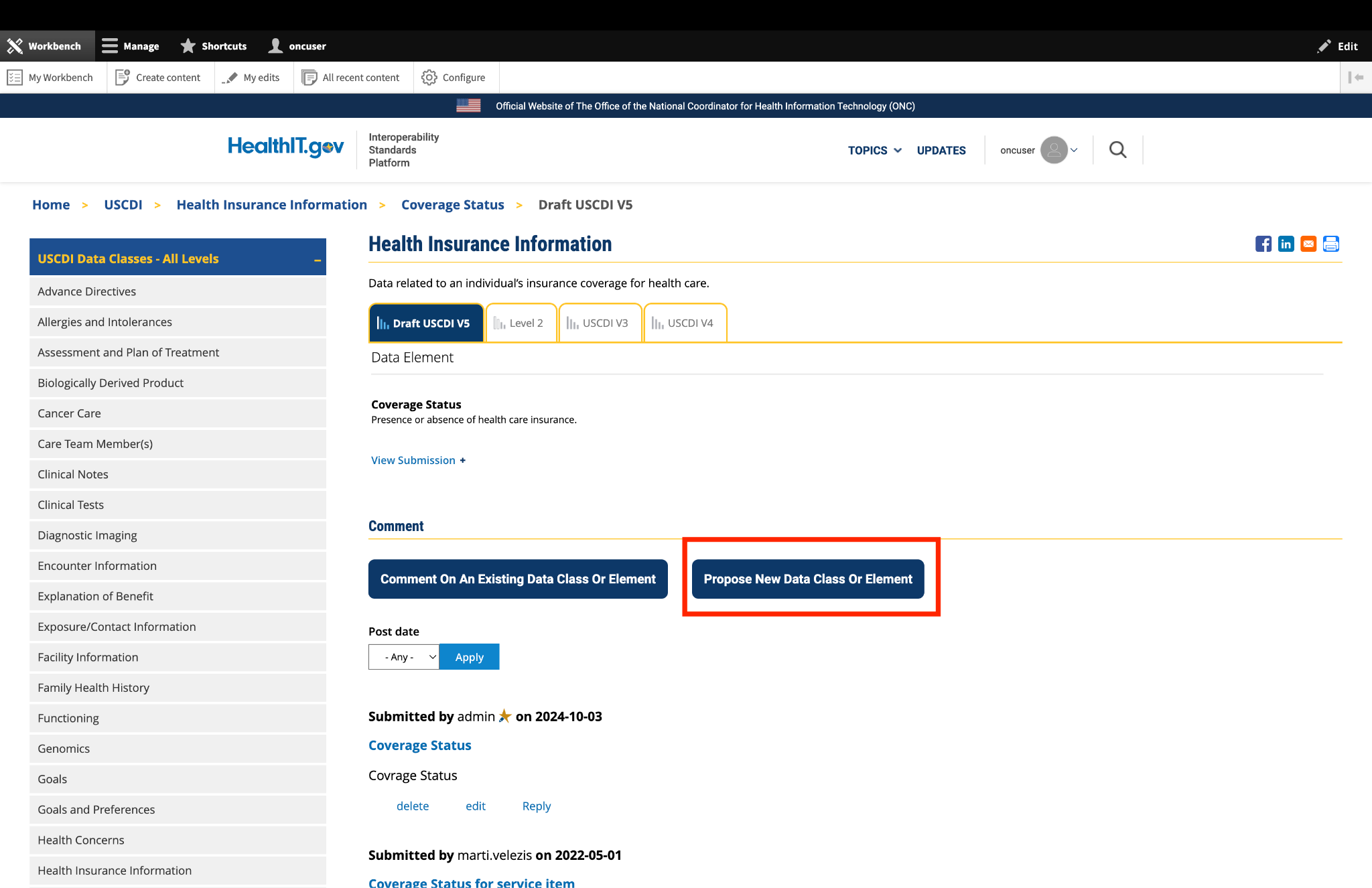
Instead of clicking the "Comment On An Existing Data Class Or Element" button, click the adjacent button labeled "Propose a New Data Class or Data Element."
This will redirect you to the ONDEC (ONC New Data Element and Class) Submission System.
In the ONDEC system, follow the provided instructions to submit your proposal for a new data class or element.
Once your proposal is submitted through ONDEC, it will be reviewed separately from the commenting process.
Fig 2 The "Propose a New Data Class or Data Element" button redirects users to the ONDEC Submission System for proposing new data elements not currently available in the system.
5. Complete the Comment Form
Fill out the required fields in the comment form:
Subject: Enter a brief, descriptive title that summarizes your comment. This helps reviewers quickly understand the nature of your feedback.
Comment: In this field, provide the full details of your comment or feedback. Be as clear and specific as possible about your suggestions, concerns, or observations. Include any relevant details that support your position.
6. Optional: Add Additional Comments
If you need to comment on multiple data classes or elements:
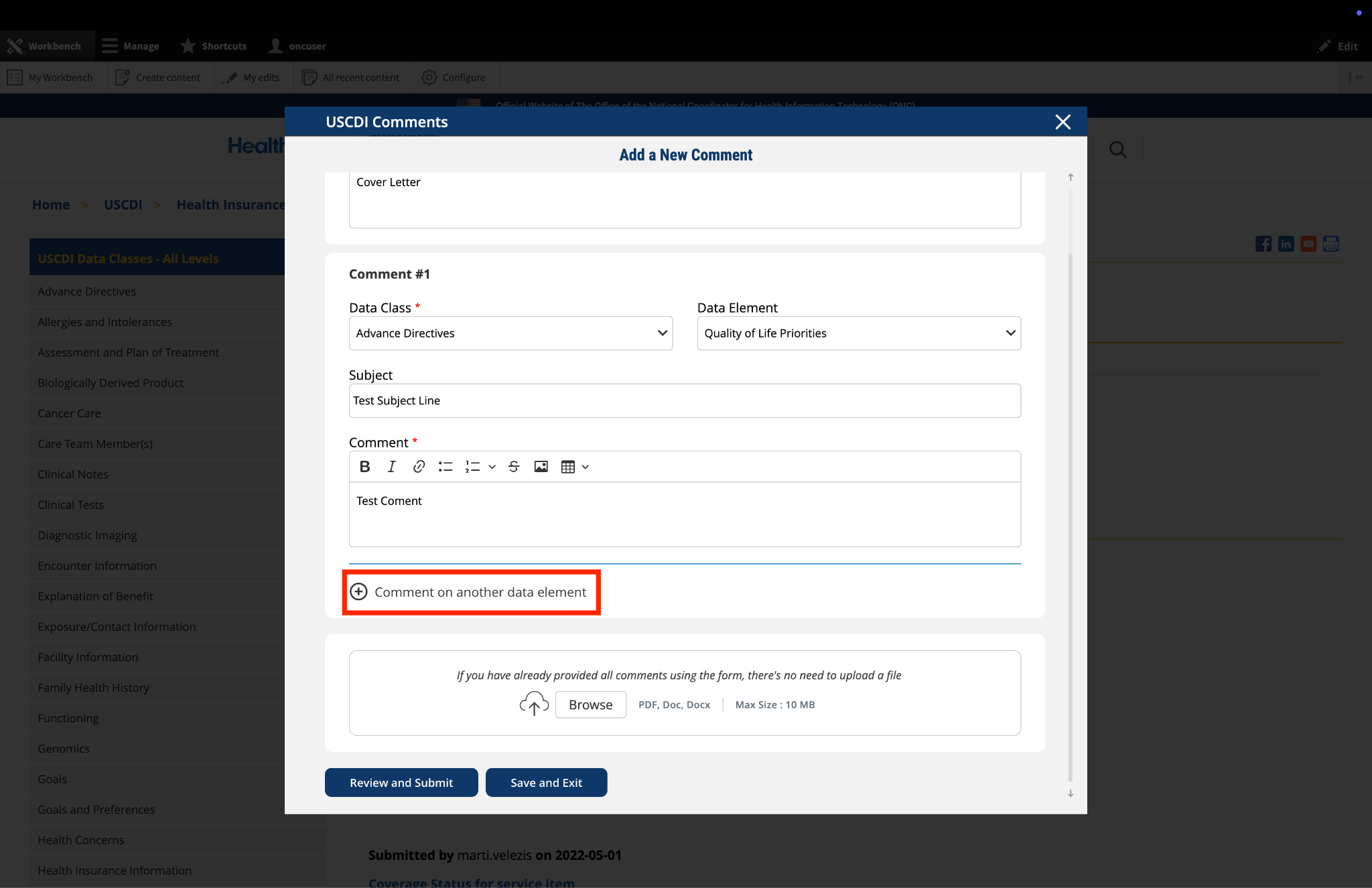
After completing your first comment, click the link labeled "Comment on another data element" at the bottom of the form.
A new comment section will appear, allowing you to enter details for your additional comment.
For each additional comment, you must select the appropriate data class and data element from the drop-down menus.
Complete the Subject and Comment fields for your additional comment.
Repeat this process for each additional comment you wish to submit.
Fig 3 The "Comment on another data element" link enables users to create multiple comments addressing different elements within a single submission.
7. Optional: Upload Supporting Files
The platform allows you to upload supporting documentation to enhance your comment:
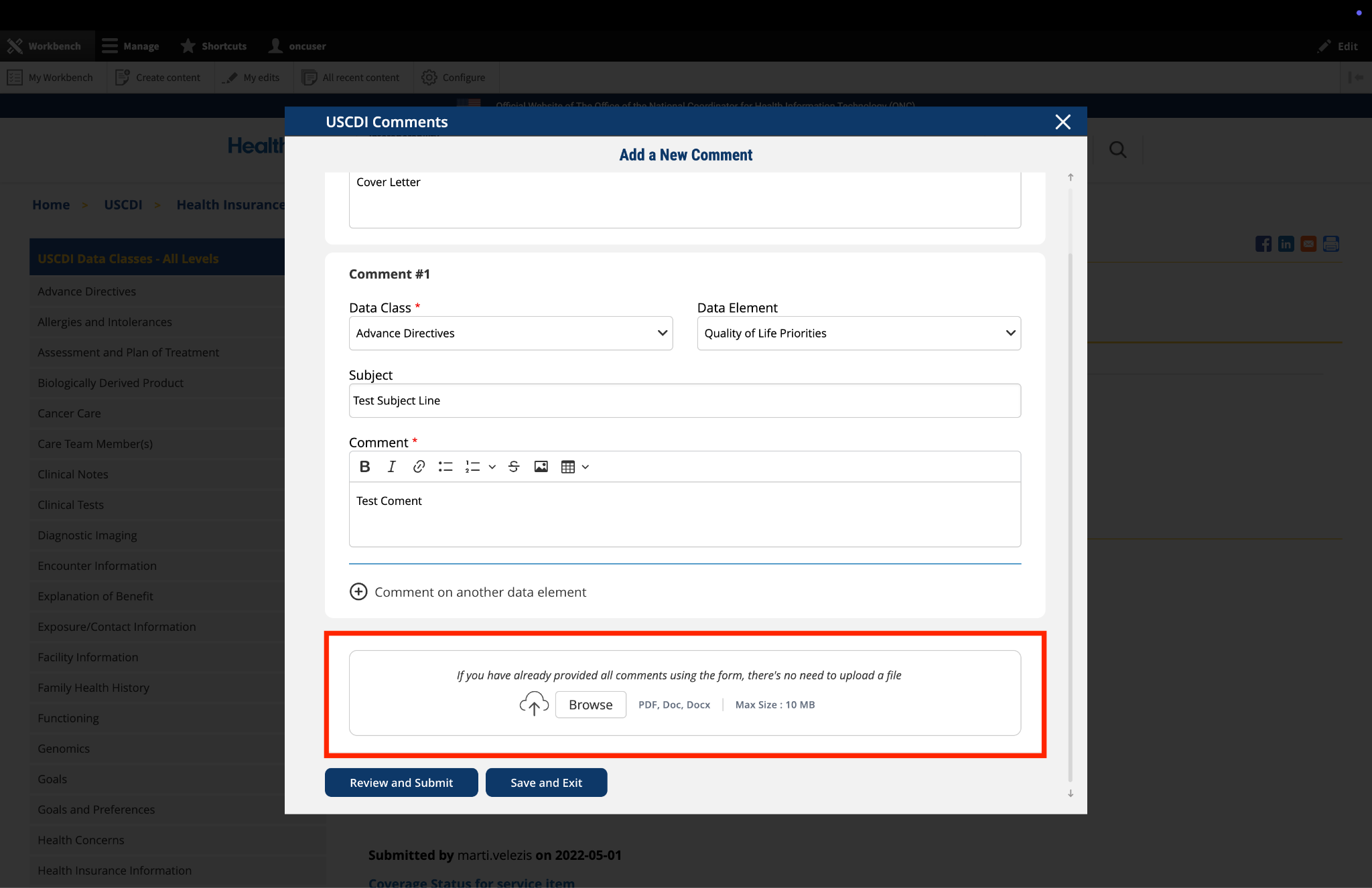
Locate the "File Upload" section at the bottom of the comment form.
Click to upload any files (such as PDFs or documents) that provide additional context, evidence, or clarification for your comment.
Important: If you have already entered your comments using the form fields, there is no need to upload duplicate content in PDF format. The file upload feature is intended for supplementary materials only. Please avoid uploading files that contain the same information already provided in your comment text.
Fig 4 The "File Upload" section permits users to attach supporting documentation that supplements their written comments.
8. Optional: Save and Exit
If you need to pause your work and return to complete your comment later:
Click the "Save and Exit" button at the bottom of the form.
Your comment will be saved as a draft that you can access and complete later.
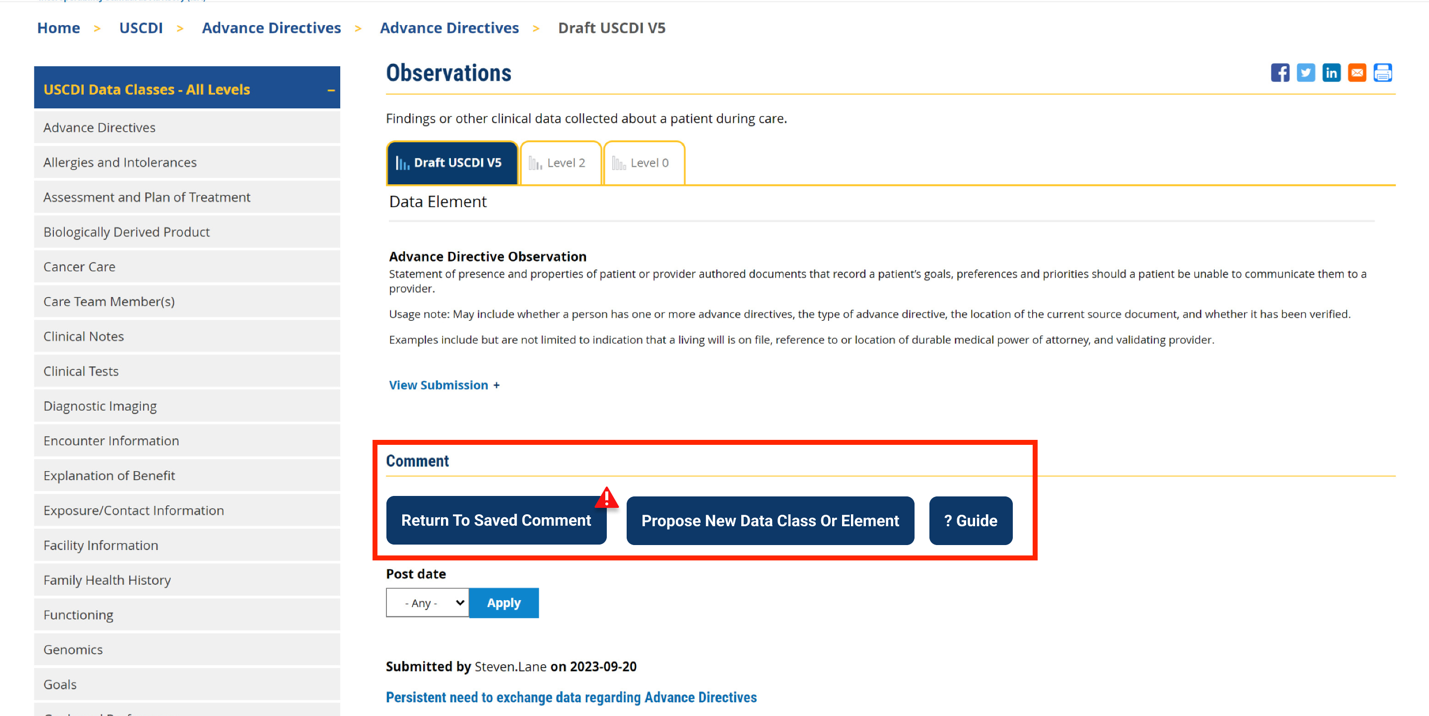
When you return to the platform, you will see a red triangle with an exclamation mark next to the “Return to saved Comment” button, indicating that you have saved comments in draft status.
Click this button to continue working on your draft.
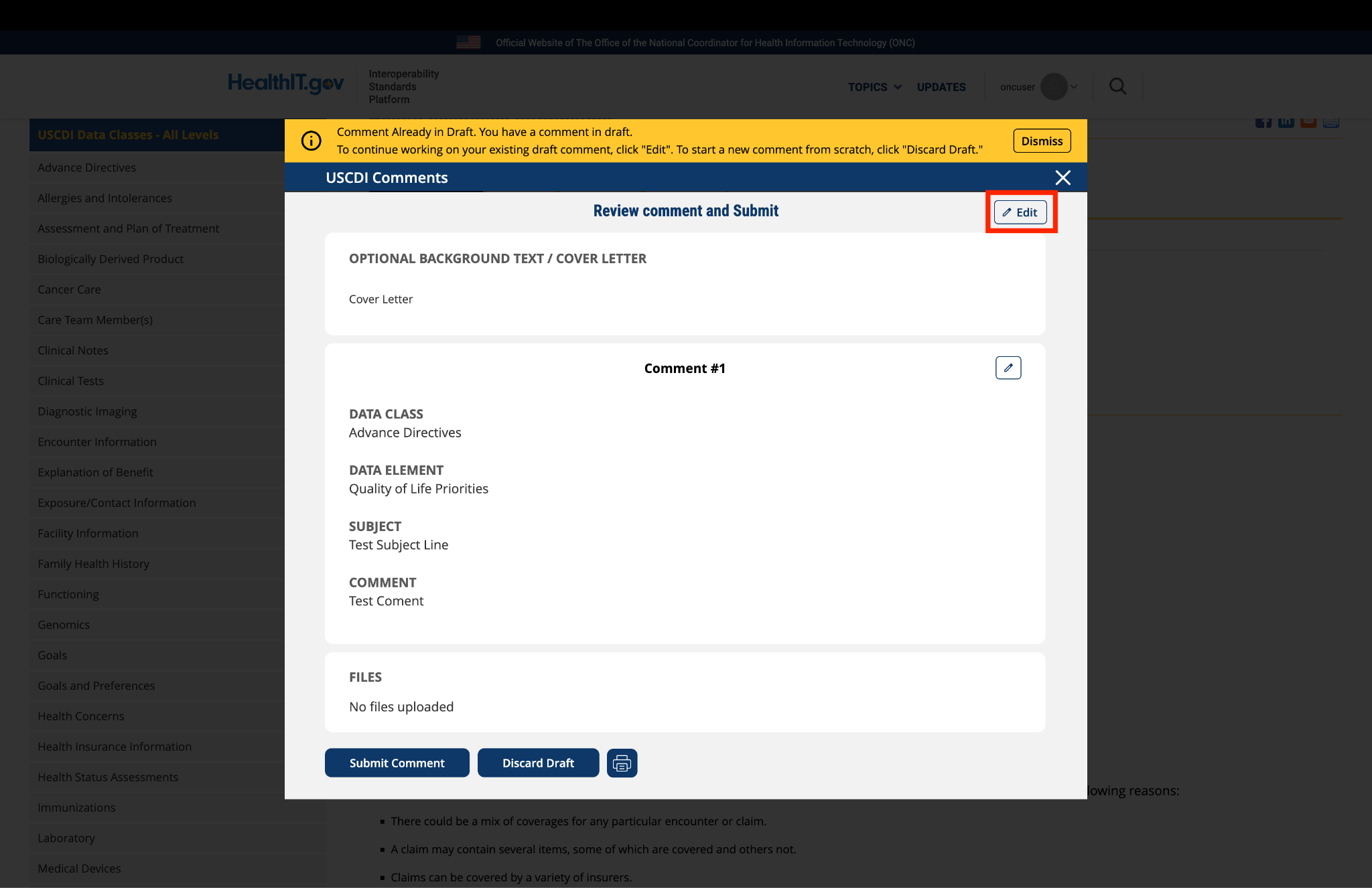
You will be taken to a review page where you can:
Select "Submit Comment" to officially submit your feedback.
Click "Edit" to return to the comment form and make changes
Select "Discard Draft" to delete the saved draft and start fresh
Fig 5 A red triangle with exclamation mark indicator appears next to the “Return to saved Comment” button when draft comments are saved in the system.
9. Review and Submit
Once you have completed your comment:
Click the "Review and Submit" button at the bottom of the form.
This will take you to a review screen displaying your comment(s) in full.
Review all information for accuracy and completeness.
On this review screen, you have three options:
Click "Submit Comment" to officially submit your feedback
Click "Edit" to return to the comment form and make changes
Click "Discard Draft" to delete the comment and start fresh
The review screen also includes a "Print" button that allows you to create a printed copy of your comments for your records.
If you choose to submit, your comment will be recorded in the system and made available for review by the appropriate stakeholders.
Fig 6 The review screen allows users to verify comment content and make any necessary modifications before final submission.


Submitted by NCQA on
NCQA v8 recommendation: Performance Time
Recommendation: Broaden the examples to indicate that this element could also apply to care plan documentation, note documentation and health status assessments.
Rationale: While this element notes the stated care actions are only examples, we recommend broadening the examples to include a range of care activities to ensure performance time for all care activities are made available for exchange. Performance time is a critical attribute to understand relevant timing to other care activities and timeliness of care actions. Including additional examples related to clinical notes and care plans as well as health assessments will strengthen this element definition.
Evidence: This attribute should be available across all relevant data elements and is routinely captured in care workflows; US Core profiles include timing elements as ‘must have’ or ‘must support’ in nearly all profiles. Additionally, timing is critical for patient care and coordination for providers to understand how recent or relevant a piece of health information is in current care being provided; Timing is also critical and used across quality measures in all care settings to confirm a care action was completed in the timeframe being assessed.