Description (*Please confirm or update this field for the new USCDI version*)
Explanation or justification for a referral or consultation.
Submitted By: Adam Bazer, MPD
/ Integrating the Healthcare Enterprise USA (IHE USA)
Data Element Information
Data Element Description
An explanation or justification for why this service is being requested in coded or textual form. This is often for billing purposes.
Use Case Description(s)
Use Case Description
This use case pertains to the adoption of all of the defined data elements to be used as in the following use case.
a 28-year-old female, is going home from the hospital after having an infection due to systemic fibrosis. The doctors prescribed oxygen after treatment, and call a transport company to take her to a rehabilitation center. Alison is a paraplegic and is wheelchair bound. Due to the prescribed oxygen, there needs to be monitoring for her transport. The hospital creates a referral for her transport. The reasons for referral are heavily used to justify her transport for billing and payment. The referral requestor is used to identify who is requesting the service. The referral coverage includes the insurance information that may be needed to cover the event. The referral code indicates what type of service is being requested, in this case interfacility transport.
Estimate the breadth of applicability of the use case(s) for this data element
This data class would utilized by emergency responders and ambulance systems that are used for interfacility transport. It will also be of interest for any provider engaged in continuity of care referrals.
This data element has been used at scale between multiple different production environments to support the majority of anticipated stakeholders
Supporting Artifacts
360 Exchange Closed Loop Referral (360X) Connecathon testing in 2019
Used in multiple HIMSS Demos
Extent of exchange
5 or more. This data element has been tested at scale between multiple different production environments to support the majority of anticipated stakeholders.
Potential Challenges
Restrictions on Standardization (e.g. proprietary code)
none
Restrictions on Use (e.g. licensing, user fees)
none
Privacy and Security Concerns
none
Estimate of Overall Burden
I anticipate that this may have a low burden for implementation since this data class and elements exist in FHIR and CDA for medical referrals, which has a large populations of stakeholders that already use this data class.
Other Implementation Challenges
none
Comment
Submitted byportmi3 on
Commenter: Michael Porter, Mport Media Group, Inc. (Discharge Bridge — care-transition orchestration).
We support USCDI v7 Referral Order, Referral Note, and Reason for Referral for hospital → SNF / post-acute exchange. Please keep SNF / post-acute explicitly in examples and vocabulary guidance.
We support Medication Order and Medication Administration for transition medication safety, and recommend leveling Level 0 Discharge medications (and Medication List Type as applicable) so implementers can exchange a reconciled active list at handoff distinct from open orders vs administration.
We support Encounter Disposition, Appointment, Healthcare Agent, and Discharge Summary Note for operational handoff / decision-maker / disposition context, mapping to these existing elements before inventing new definitions.
(3) We recommend evaluating structured Prior Authorization Determination Status for inclusion or leveling (ONDEC or comment adjacent to Health Insurance Information / related coverage elements), because authorization fragmentation blocks timely acute→post-acute transitions and is relevant under CMS interoperability and prior-authorization directions that reference USCDI. Prefer placement under Health Insurance Information or Orders as ONC prefers — not a new data class.
(4) Prefer mapping operational handoff needs to existing USCDI elements — Encounter Disposition, Discharge Summary Note, Healthcare Agent, Facility Information — and leveling Level 0 Discharge medications — before inventing new definitions. ONDEC Post-acute Placement Disposition only if Encounter Disposition cannot close SNF acceptance/decline + destination + level of care + bed-ready timing.
This comment reflects an implementer perspective. It does not imply ONC endorsement and does not claim HIPAA or SOC 2 certification.
CareQuest Institute for Oral Health recommends creating a separate data class for Referral with its own data elements including Reason for Referral. A referral can also be an intervention as part of a patient’s treatment plan to address a health problem or diagnosis. When a CCD document is generated and shared externally, a referral should display as part of the patient’s treatment plan or order to request additional care and is not always a procedure that was completed as part of the provision of care from that visit.
Health records are also sent to HIEs or are exchanged with other entities such as QHINS, QIOs to be made available to the patient’s care team when requested. It would be helpful to have additional information included about the referral to provide more context to the care team member reviewing the summary of care document. This will also better support coordination of care for both the Primary Care providers as well as other specialties such as Oral Health providers.
In most cases, this may be the only record to which a provider would have access. Therefore, data elements in the USCDI should also furnish the provider with enough information to administer the appropriate service that is needed, thereby closing the loop on the referral.
For broader sharing of electronic health information and to be inclusive of all specialties such as Oral Health, the USCDI is critical toward establishing the basic standards to support both patient care and care coordination for all providers in a community.
NCPDP recommends the use of SNOMED CT codes. Pharmacists document “Reason for Referral" in the NCPDP/HL7 Pharmacist eCare Plan using SNOMED CT codes. For example, used within the NCPDP/HL7 Pharmacist eCare Plan, the SNOMED CT codes are in two value sets the NLM VSAC “PharmacyReferralsTo” OID 2.16.840.1.113762.1.4.1096.203 and “PharmacyReferralsFrom” OID 2.16.840.1.113762.1.4.1096.216.
NCPDP recommends the use of SNOMED CT. Pharmacists document “Reason for Referral" in the NCPDP/HL7 Pharmacist eCare Plan using SNOMED CT. These SNOMED CT codes are in 2 value sets the NLM VSAC “PharmacyReferralsTo” OID 2.16.840.1.113762.1.4.1096.203 and “PharmacyReferralsFrom” OID 2.16.840.1.113762.1.4.1096.216.
The data element Reason for Referral is listed under Procedures; however, referrals are not limited to the completion of a procedure. Orders often include referrals but can be considered as a Plan of Treatment. We note that in C-CDA, referrals are listed as part of the plan of treatment. Lantana recommends placing this data element under Care and Treatment Plans category.
Referral data elements, such as reason, requestor, and coverage, are important to support CDC’s efforts in streamlining the efficient exchange of health information between healthcare providers and principally extra-clinical program service systems that reside in community services, lifestyle change, public health, and other organizations. These data elements play a major role in identifying appropriate services based on the patient’s health needs and aid in ensuring appropriate parties involved in the overall health and wellbeing of the patient are receiving information regarding the patient intake outcome, referral service provisioning, and final referral outcome. The referral data elements are also useful to understand how often patients are referred to specialist for occupational illnesses.
Support for healthcare aims: Also supports Improving health of populations and Reducing cost of care, Improving provider experience of care.
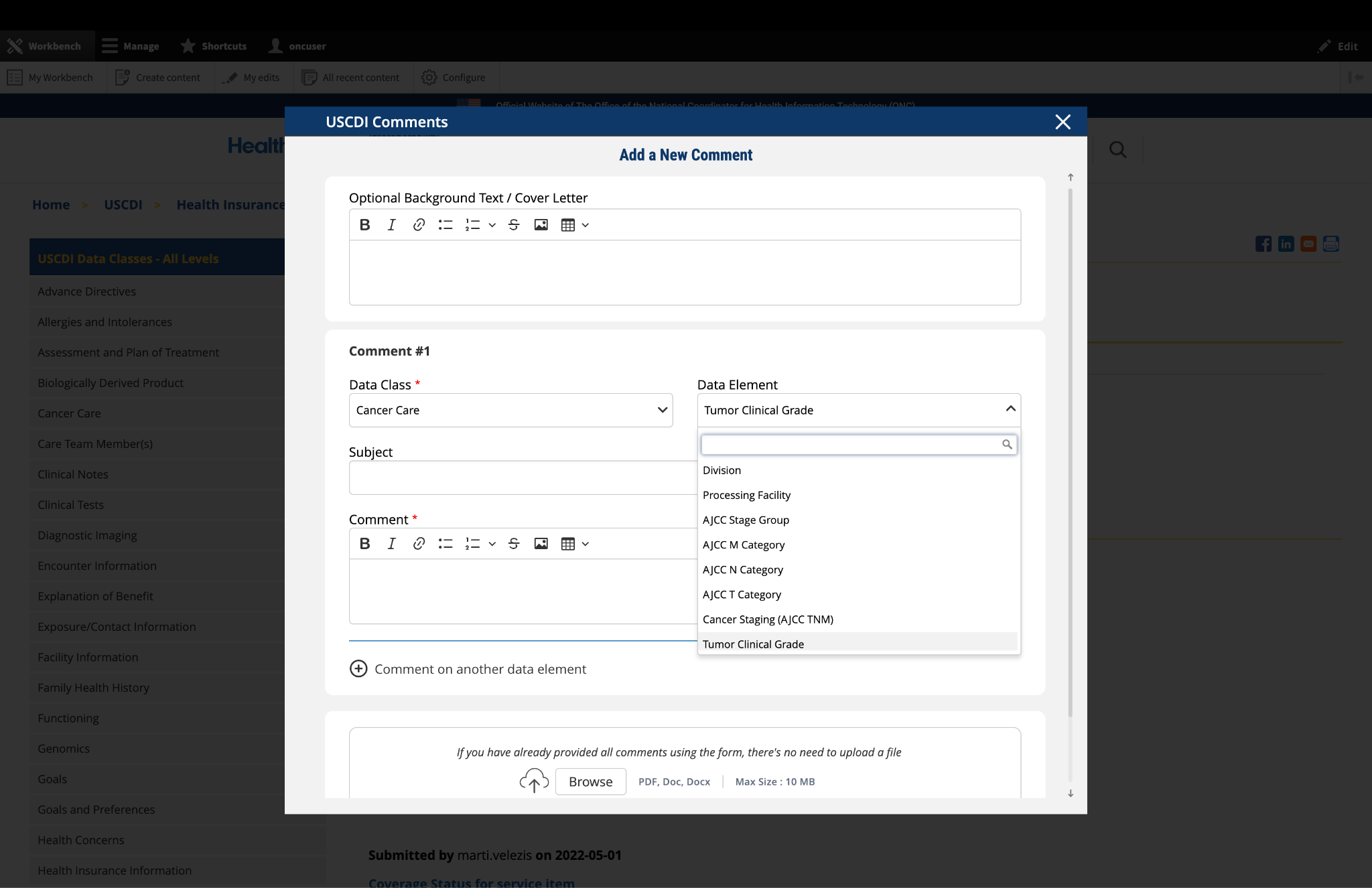
The "Optional Background Text / Cover Letter" field provides space for additional context or introductory information related to your comment.
If you wish to provide context, explanation, or an introduction to your comment, enter this information in the field labeled "Optional Background Text / Cover Letter." This is entirely optional and is most useful when submitting multiple related comments or when additional background would help reviewers understand your feedback.
If you are only commenting on a single data class or element, you may leave this field blank.
2. Select the Data Class
To specify which data class your comment addresses:
In the "Data Class" drop-down menu, select the appropriate data class you want to comment on.
If you are providing a general comment that is not specific to a data element, select "General" from the options. Comments with this designation will be displayed on the USCDI landing page.
Note that the Data Class field will automatically populate based on your current location in the platform:
If you are on a data class page, the field will be set to that specific data class
If you are on a data element page, the corresponding data class will be pre-selected
3. Select the Data Element
To specify which data element your comment addresses:
In the "Data Element" drop-down menu, select the specific data element you want to comment on.
The drop-down menu will display only the elements available under the data class you selected in the previous step.
You can use the search function within the drop-down to quickly locate a specific data element.
If you are commenting on the data class itself rather than a specific element, you may leave this field blank.
Note: Comments on a specific data element will appear on the respective data element page, while comments on a data class (without a specific element selected) will appear on the landing page for that data class.
Fig 1 The "Data Class" and "Data Element" dropdown menus allow users to specify the exact content they wish to comment on.
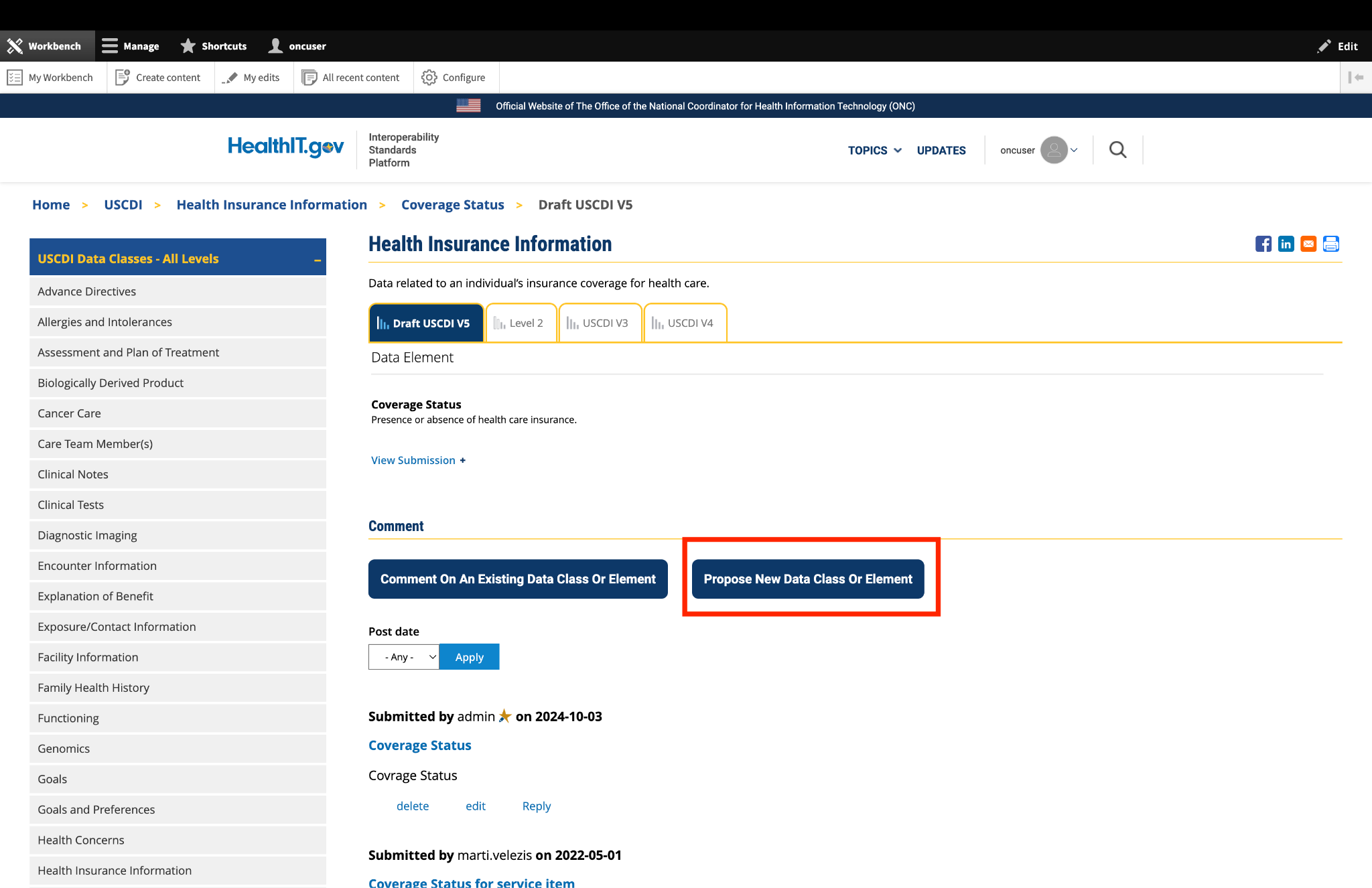
4. Optional: Propose New Data Class or Element
If you cannot find the appropriate data class or element for your comment:
Instead of clicking the "Comment On An Existing Data Class Or Element" button, click the adjacent button labeled "Propose a New Data Class or Data Element."
This will redirect you to the ONDEC (ONC New Data Element and Class) Submission System.
In the ONDEC system, follow the provided instructions to submit your proposal for a new data class or element.
Once your proposal is submitted through ONDEC, it will be reviewed separately from the commenting process.
Fig 2 The "Propose a New Data Class or Data Element" button redirects users to the ONDEC Submission System for proposing new data elements not currently available in the system.
5. Complete the Comment Form
Fill out the required fields in the comment form:
Subject: Enter a brief, descriptive title that summarizes your comment. This helps reviewers quickly understand the nature of your feedback.
Comment: In this field, provide the full details of your comment or feedback. Be as clear and specific as possible about your suggestions, concerns, or observations. Include any relevant details that support your position.
6. Optional: Add Additional Comments
If you need to comment on multiple data classes or elements:
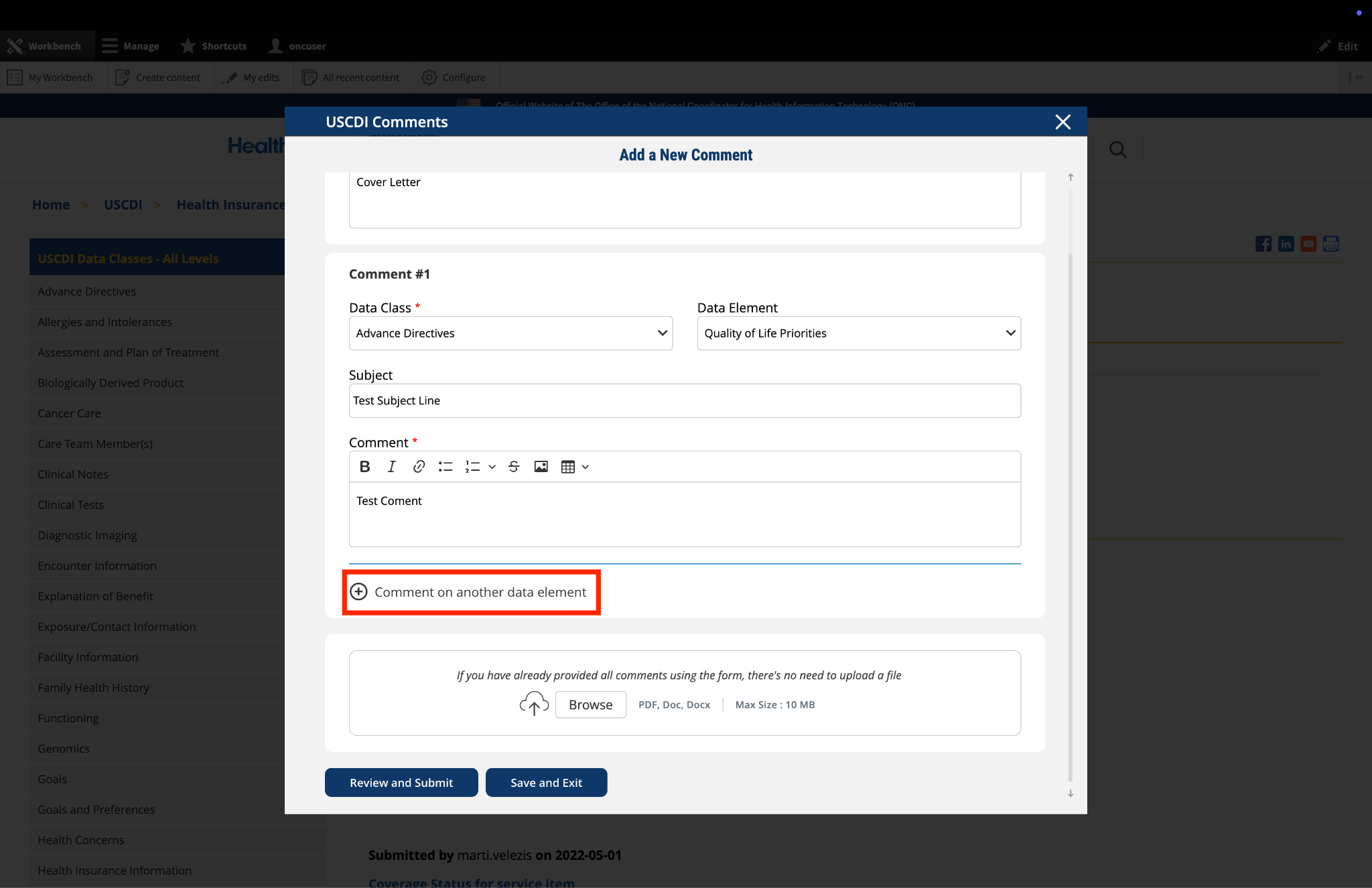
After completing your first comment, click the link labeled "Comment on another data element" at the bottom of the form.
A new comment section will appear, allowing you to enter details for your additional comment.
For each additional comment, you must select the appropriate data class and data element from the drop-down menus.
Complete the Subject and Comment fields for your additional comment.
Repeat this process for each additional comment you wish to submit.
Fig 3 The "Comment on another data element" link enables users to create multiple comments addressing different elements within a single submission.
7. Optional: Upload Supporting Files
The platform allows you to upload supporting documentation to enhance your comment:
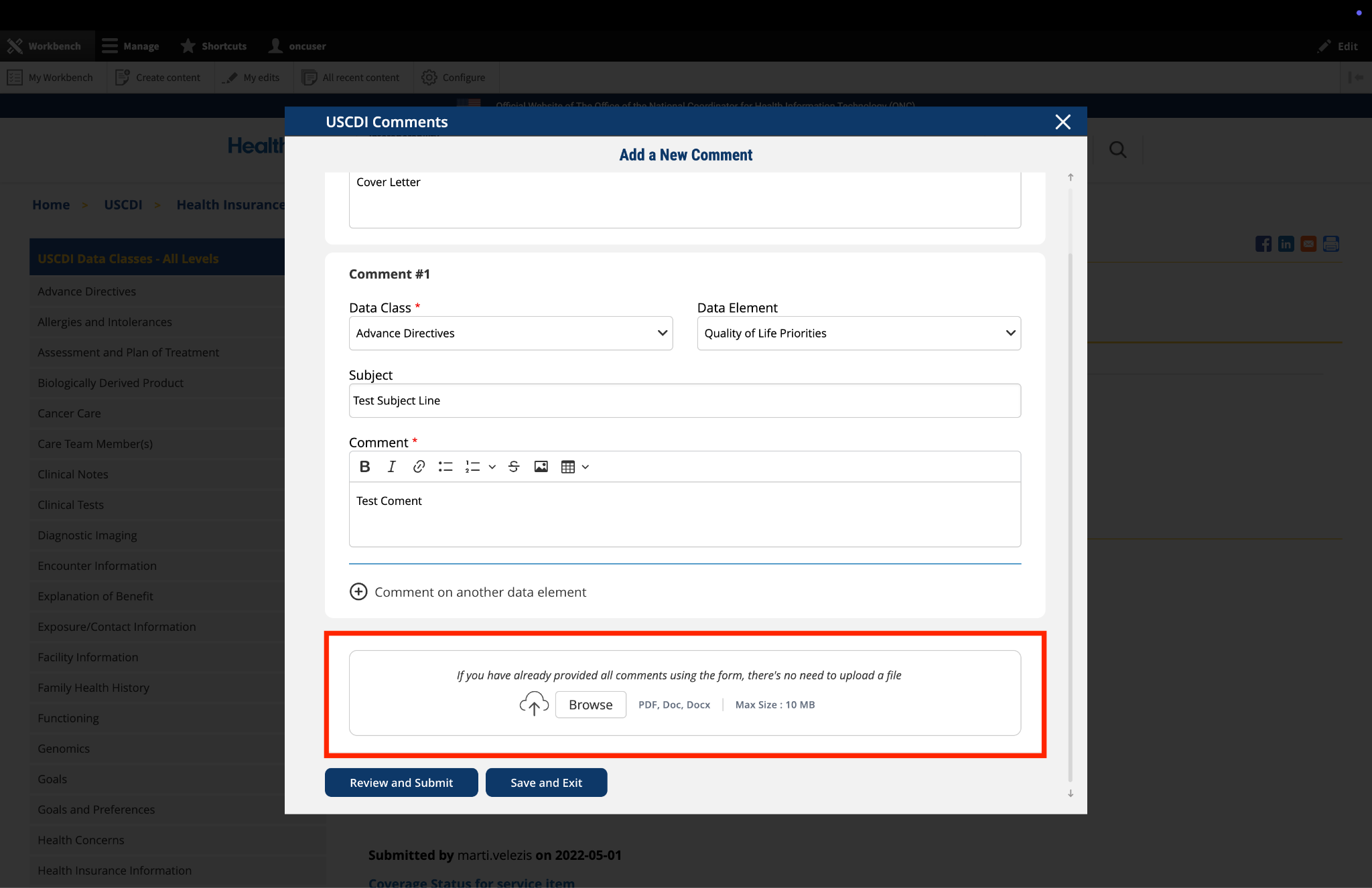
Locate the "File Upload" section at the bottom of the comment form.
Click to upload any files (such as PDFs or documents) that provide additional context, evidence, or clarification for your comment.
Important: If you have already entered your comments using the form fields, there is no need to upload duplicate content in PDF format. The file upload feature is intended for supplementary materials only. Please avoid uploading files that contain the same information already provided in your comment text.
Fig 4 The "File Upload" section permits users to attach supporting documentation that supplements their written comments.
8. Optional: Save and Exit
If you need to pause your work and return to complete your comment later:
Click the "Save and Exit" button at the bottom of the form.
Your comment will be saved as a draft that you can access and complete later.
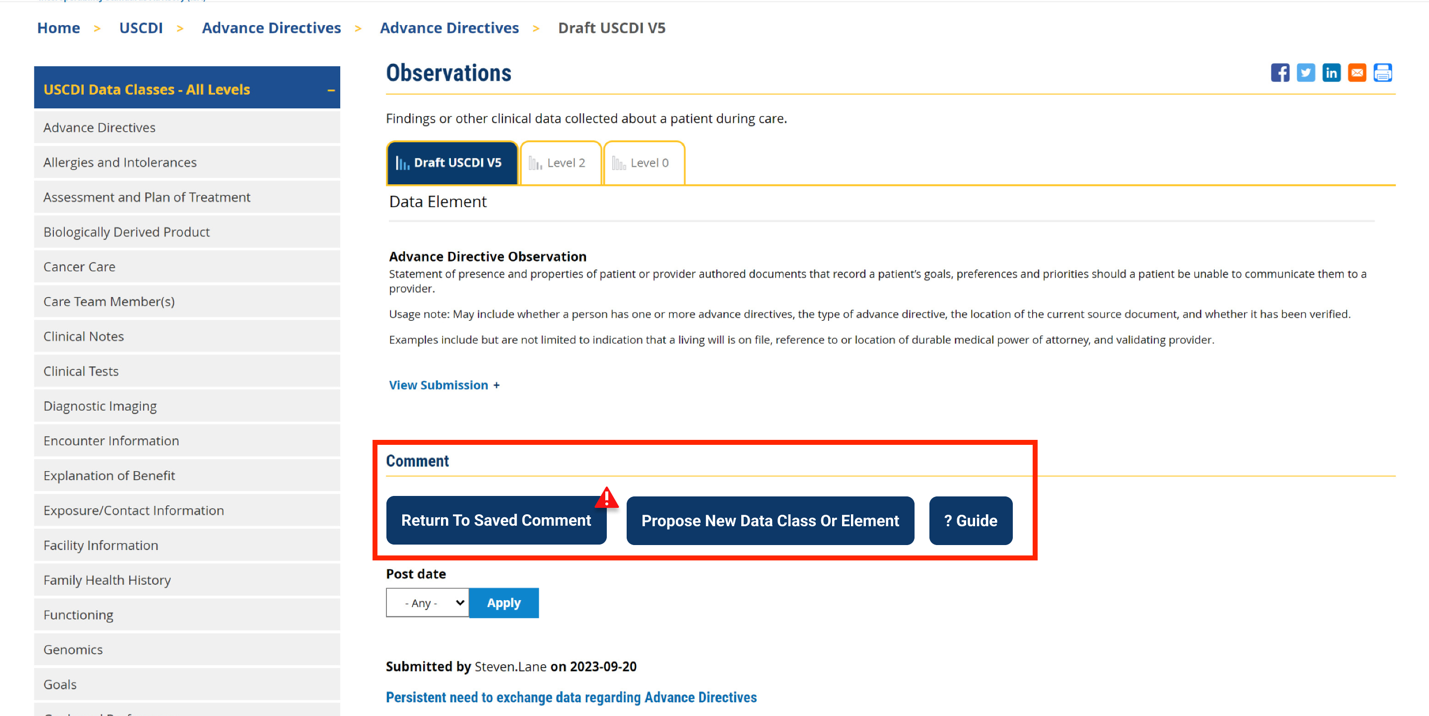
When you return to the platform, you will see a red triangle with an exclamation mark next to the “Return to saved Comment” button, indicating that you have saved comments in draft status.
Click this button to continue working on your draft.
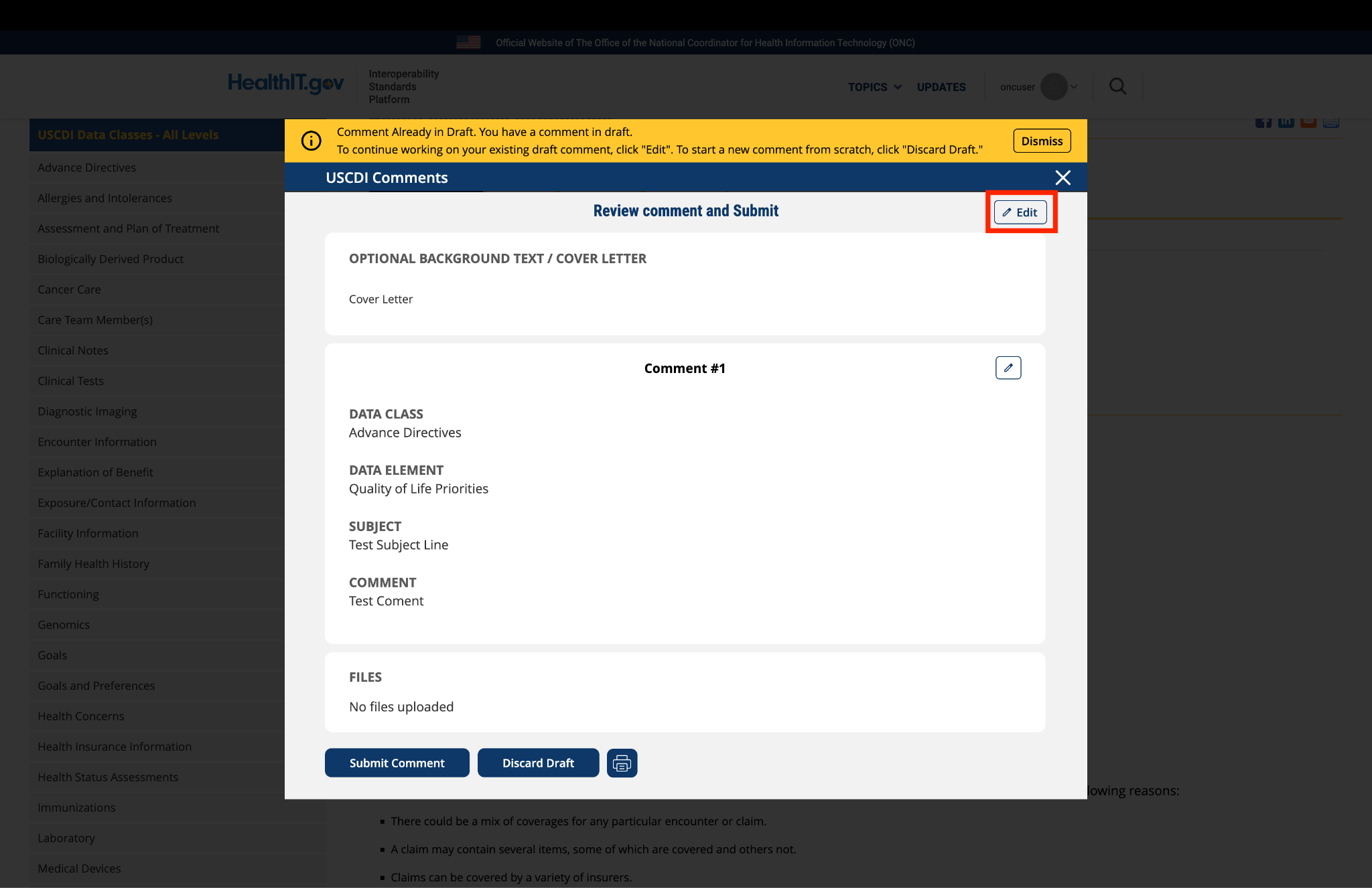
You will be taken to a review page where you can:
Select "Submit Comment" to officially submit your feedback.
Click "Edit" to return to the comment form and make changes
Select "Discard Draft" to delete the saved draft and start fresh
Fig 5 A red triangle with exclamation mark indicator appears next to the “Return to saved Comment” button when draft comments are saved in the system.
9. Review and Submit
Once you have completed your comment:
Click the "Review and Submit" button at the bottom of the form.
This will take you to a review screen displaying your comment(s) in full.
Review all information for accuracy and completeness.
On this review screen, you have three options:
Click "Submit Comment" to officially submit your feedback
Click "Edit" to return to the comment form and make changes
Click "Discard Draft" to delete the comment and start fresh
The review screen also includes a "Print" button that allows you to create a printed copy of your comments for your records.
If you choose to submit, your comment will be recorded in the system and made available for review by the appropriate stakeholders.
Fig 6 The review screen allows users to verify comment content and make any necessary modifications before final submission.


Submitted by portmi3 on
Commenter: Michael Porter, Mport Media Group, Inc. (Discharge Bridge — care-transition orchestration).
We support USCDI v7 Referral Order, Referral Note, and Reason for Referral for hospital → SNF / post-acute exchange. Please keep SNF / post-acute explicitly in examples and vocabulary guidance.
We support Medication Order and Medication Administration for transition medication safety, and recommend leveling Level 0 Discharge medications (and Medication List Type as applicable) so implementers can exchange a reconciled active list at handoff distinct from open orders vs administration.
We support Encounter Disposition, Appointment, Healthcare Agent, and Discharge Summary Note for operational handoff / decision-maker / disposition context, mapping to these existing elements before inventing new definitions.
(3) We recommend evaluating structured Prior Authorization Determination Status for inclusion or leveling (ONDEC or comment adjacent to Health Insurance Information / related coverage elements), because authorization fragmentation blocks timely acute→post-acute transitions and is relevant under CMS interoperability and prior-authorization directions that reference USCDI. Prefer placement under Health Insurance Information or Orders as ONC prefers — not a new data class.
(4) Prefer mapping operational handoff needs to existing USCDI elements — Encounter Disposition, Discharge Summary Note, Healthcare Agent, Facility Information — and leveling Level 0 Discharge medications — before inventing new definitions. ONDEC Post-acute Placement Disposition only if Encounter Disposition cannot close SNF acceptance/decline + destination + level of care + bed-ready timing.
This comment reflects an implementer perspective. It does not imply ONC endorsement and does not claim HIPAA or SOC 2 certification.